

Signal now offers a feature called “automatic key verification” which complements the existing safety number system. Signal is always end-to-end encrypted, and automatic key verification provides an additional, streamlined way to confirm that there’s no unexpected party between you and the other “end” of an end-to-end encrypted session.
It works through a system of verifications performed by you, your Signal connections, and third-party auditors that together provide the same assurance as manually verifying safety numbers. Unlike safety numbers, these verifications are done independently and do not require an in-person meeting or a secondary communication channel.
This system of verifications ensures that the association between a phone number or username and its public encryption key is globally consistent and transparent to all participants in Signal’s ecosystem. This protects against scenarios where a key is swapped out without the key owner’s knowledge — for example, if a malicious party compromised Signal and associated a different key with your connection’s phone number.
To see this feature in action, go to a Signal connection’s profile, hit “View Safety Number,” and tap on the “Verify automatically” button under the “Automatic key verification” heading. The button will show a green checkmark and “Encryption verified” when the feature is available and verification succeeds. Over time, this verification, combined with the ones continually performed by your Signal connection and third-party auditors, ensures the consistency of this Signal connection’s key across the Signal ecosystem.
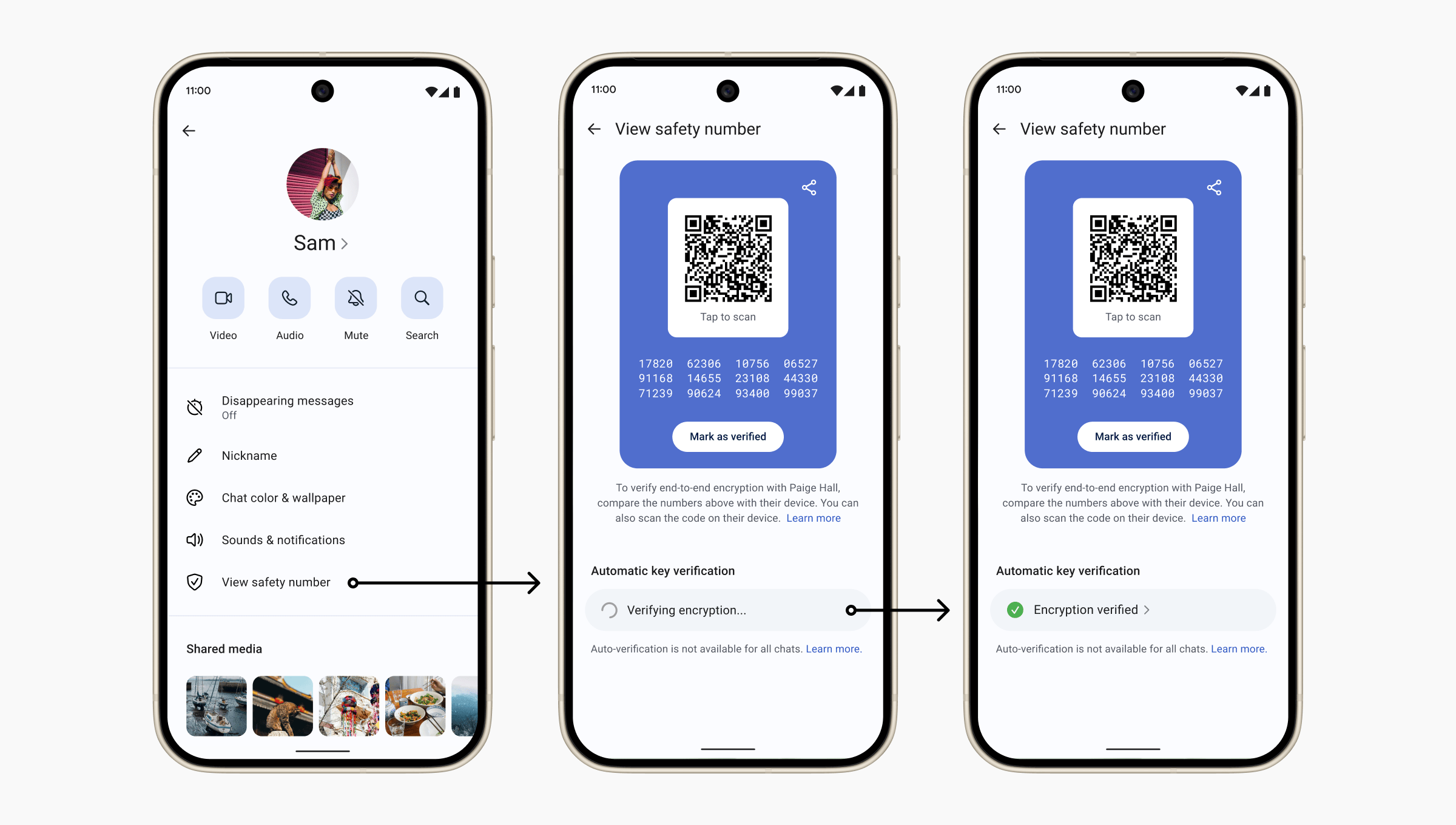
This feature is built on a concept known as “key transparency,” which is the term we’ll use throughout the rest of this post as we explain why we built a key transparency system and give a high-level overview of how it works.
A primer on public and private keys
Asymmetric cryptography is what enables you to send messages to your friend that only your friend can read. It involves a pair of mathematically-linked keys called the public key and private key, which can be used in a variety of applications including sending and receiving messages.
Imagine you have a locked mailbox with a slot. Your public key is like your mailbox address — you can share it with anyone who wants to send mail to you. Your private key is like the mailbox key. You’re the only person that has it, and you can use it to read messages sent to you. Anyone can drop mail in your mailbox (encrypt with your public key), but only you can unlock and read it (decrypt with your private key). Your mailbox address must be publicly available; you can’t receive mail if no one knows where to send it.
When you sign up for Signal, the Signal app generates a public/private key pair for you as part of the registration process1. The private key stays on your device — only you, not Signal, not anyone else, have access to this private key. Your public key is sent to Signal, which acts as a central directory for all users’ public keys. When you want to send a message to another Signal user, you ask Signal for your connection’s public key and encrypt your message with the key that Signal hands back and your private key.
Mallory in the middle attack
Sending messages requires fetching public keys for recipients, and fetching public keys means relying on a central directory. In theory, a malicious directory operator could carry out something called a “Mallory in the middle” attack, though doing so would require an outsider bypassing the security of major cloud providers or a privileged insider deliberately targeting a specific account. But even though this is a very advanced and unlikely attack, it’s one we still want to guard against. We’ll continue using the mailbox analogy to illustrate how this attack would hypothetically work.
Imagine Bob wants to send an invitation for coffee to his friend Alice, so Bob looks up her mailbox address in the central directory. If the directory is somehow compromised by an adversary (Mallory), it might direct Bob to Mallory’s mailbox instead of Alice’s. When Bob sends his mail to what he thinks is Alice’s mailbox, it actually goes to Mallory’s mailbox instead. Mallory then uses her own mailbox key to retrieve Bob’s message, reads it, modifies it if she chooses, puts it in a new envelope, and forwards it to Alice’s mailbox.
In her modification, Mallory could change the coffee shop location or meeting time for example, causing Alice to show up at the wrong place or time. Alice would have no indication that the message had been intercepted or tampered with, so to her, it looks like the message came directly from Bob. Meanwhile, Bob would be left waiting fruitlessly for Alice to show up. And even if Mallory chose not to alter Bob’s message, her ability to read it at all constitutes a serious breach of communication privacy.
Miscommunication about coffee is relatively low-stakes, but this kind of attack can create far more harm in other contexts.
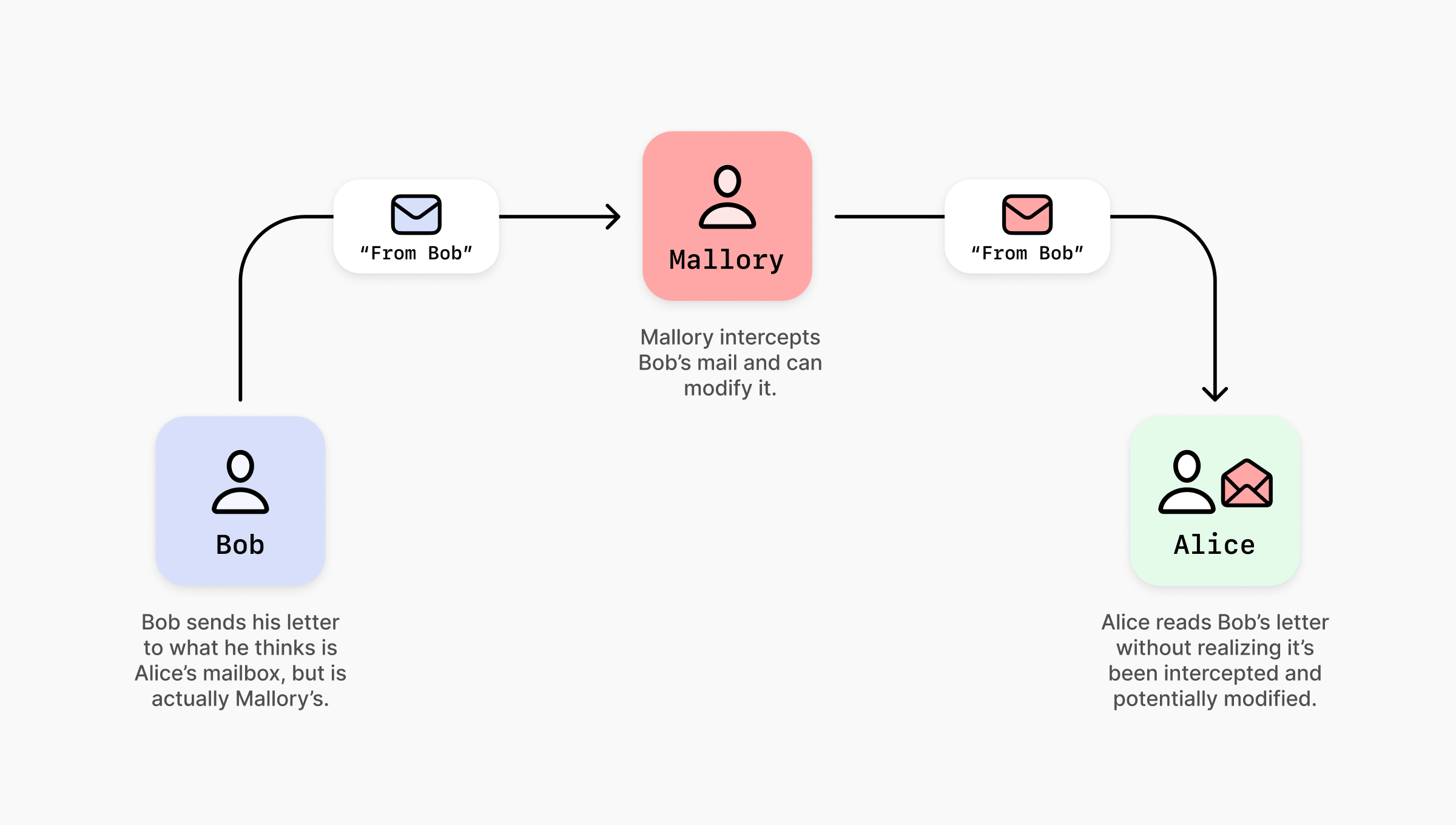
This attack works because Bob never actually verified Alice’s address. Bob just trusted that the mailbox listed in the directory is hers, which is a reasonable assumption.
But, if Bob wanted to be extra cautious, he could ask Alice for her address directly either through an in-person meeting or some secondary, trusted communication channel2, which may not be feasible if Alice and Bob are strictly pen pals.
So, how does Bob verify Alice’s address if he cannot meet her in person or use a secondary channel?
In the rest of this blog post, we’ll outline how we developed a design for a system that enables Bob to automatically verify the data in the central directory without needing to communicate with Alice directly.
An analogy for designing a key transparency system
One way we could help Bob verify that the directory has the correct address for Alice is to keep a record of every change ever made to the directory. If somebody changes Alice’s address in the directory, it will be captured in this chronological log and therefore detectable. To make this concrete, let’s extend the mailbox analogy.
Let’s say a clerk records everyone’s address changes in a public ledger in the city post office. Whenever anyone gets a new address or updates an existing one, the clerk adds a new page to the back of the ever-growing ledger and records the address change there. The clerk does so with a permanent marker so that once something is written, nobody can go back to a page and rip it out or modify its contents. Anyone can visit the post office and find an address in the ledger, including their own.
Using the ledger
For any given address, there are two ways for post office customers to interact with the ledger:
- A customer like Bob can look up addresses for other people (like Alice).
- A customer like Alice can look up her own address to ensure that the ledger is accurate.
For Bob to find Alice’s current address, he would have to start at the last ledger page and flip back one page at a time until he finds a page for Alice. Bob starts at the end of the ledger and works backwards because he wants Alice’s most recent address, and Alice’s address may have changed over time. As more pages are added to the ledger, this can become a lot of work for Bob, especially if Alice hasn’t updated her address in a while and there are lots of address changes for other people that Bob needs to sift through.
The ledger allows Alice to verify that her own address is listed correctly, but in order to do so she has to look at all of the new pages since her last visit and check that they never misstate her address. Like Bob, this becomes a lot of work as more pages are added to the ledger.
If Alice and Bob live in a busy city where people frequently change addresses, they would both have to do a prohibitive amount of work to use the ledger by flipping through one page at a time. We need a more efficient way for Alice and Bob to interact with the ledger.
Introducing index books
In real life, books often contain an alphabetically sorted index that allows readers to quickly locate what they’re looking for. We can apply that same idea to our ledger by introducing an alphabetically sorted index book over the names of every person whose address has been included in the ledger so far.
As new pages are added to the ledger to reflect new addresses or address changes, the index book must update too, so the clerk publishes a new copy of the index book every time they add a page to the ledger, containing the set of people whose addresses have been included in the ledger as of that page. This creates a huge library of all past index books that are available to the public.
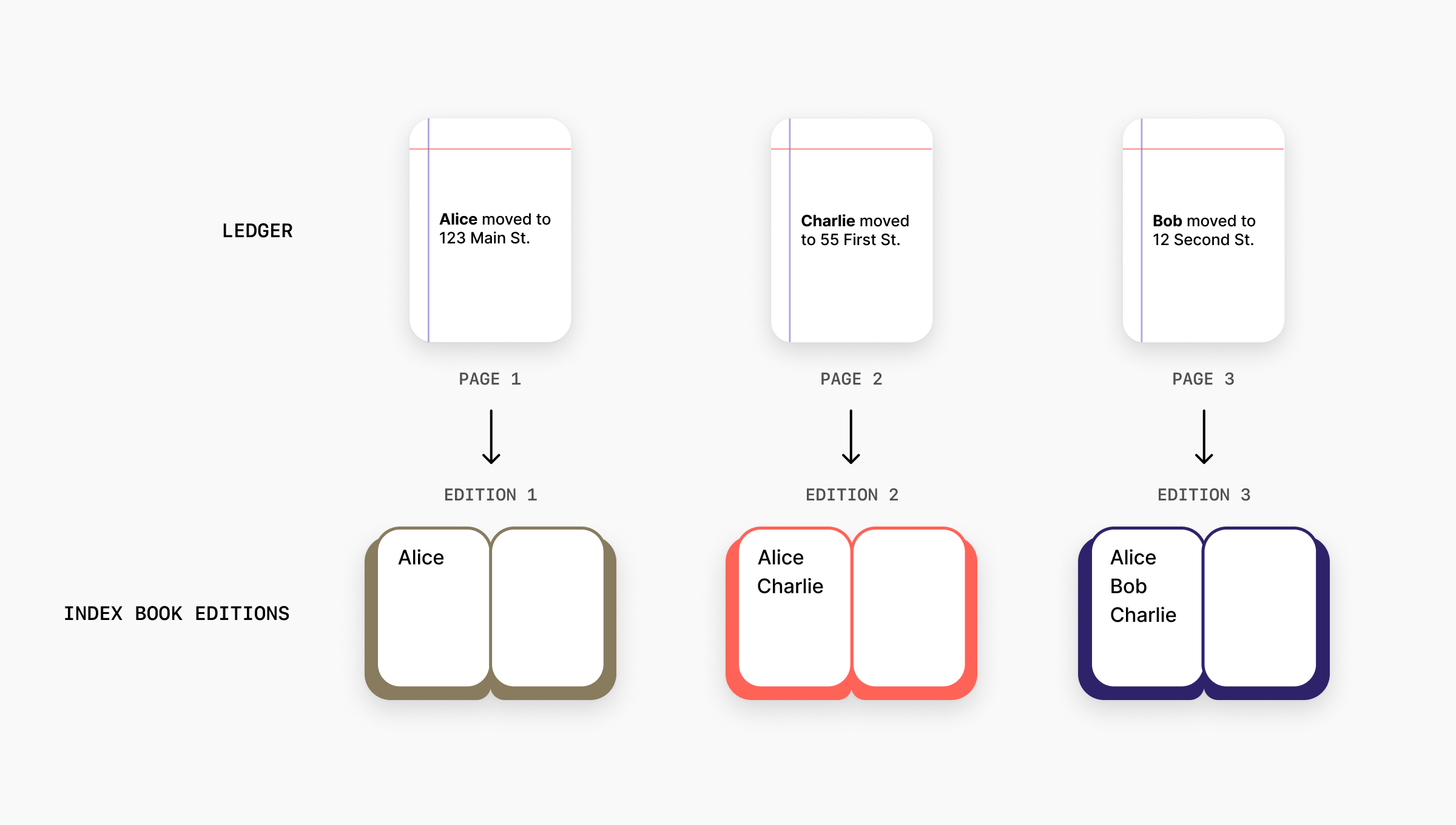
For now, let us assume that Alice and Bob are always looking at the same index book for any given page of the ledger. In the next section, we’ll discuss another component of the system that allows Alice and Bob to verify this assumption.
With this construction, Bob can now more easily look up Alice’s address in the ledger via a “binary search” strategy, one that is best illustrated via a concrete example.
Let’s say that there have been 100 new or updated addresses over a period of time, so the ledger has 100 pages and the clerk has published 100 different editions of the index book. For simplicity, we will say that Alice’s address only appears once in the ledger, when she first moved to town.
Bob starts by flipping to the middle of the ledger. He then checks the index book associated with that page. The index book is alphabetically sorted so it’s easy to find a person’s name. If Alice’s name exists in that index book, then this is either the first edition of the index book that contains an entry for Alice or the first appearance is in an earlier edition and therefore an earlier page in the ledger.
In either case, Bob can ignore the back half of the ledger and repeat the process with the front half of the ledger until he finds the exact ledger page where Alice’s address change occurred. Specifically, Bob’s search will end when he finds two adjacent index books where the first one doesn’t contain Alice’s address and the second one does.
This search process has a few benefits, the first one being that it is efficient. In a ledger with a billion pages, instead of flipping backwards (in the worst case) through all billion pages, Bob only needs to examine 30 different pages at most to find Alice’s address. Bob’s job is now much easier than it was before.
Alice still wants to make sure that the clerk never adds any new pages that are wrong about her address. However, Alice doesn’t need to check every ledger page and index book. She just needs to check the same ones that Bob looked at to find her address, which ensures that the address Bob finds for Alice has been verified by Alice herself.
This brings us to the second benefit of the search process, which is that it is deterministic when Alice and Bob look at the ledger with the same number of pages. Things get more complicated if the clerk adds more pages between Bob’s and Alice’s searches, but the main idea remains the same. In a ledger with a billion pages, Alice can follow the same search process as Bob, check the same pages that Bob checked, and ensure that none of them contain wrong information about her address.
By agreeing to a process for searching through the ledger, Alice and Bob have established a way to interact with the ledger that enables them to practically achieve their respective goals. As the ledger continues to grow, Bob has an efficient way to find Alice’s address, and Alice has an efficient way to ensure that the address Bob finds is accurate.
This analogy is simplified for the sake of clarity. In practice, Alice can update her address multiple times, and supporting this kind of search requires storing more data in the index books than just names. We’ve built an open-source key transparency server that applies these same ideas to Signal messaging.
What about the clerk?
So far, we’ve described the search process as if Alice and Bob personally flip through the ledger pages and check the index books. In practice, that’s not realistic because the ledger and index books are too large for Alice or Bob to handle directly. Instead, Alice and Bob ask the clerk to perform the search on their behalf and report back the results.
But the post office could be compromised by an adversary like Mallory who poses as the clerk and who wants to ultimately trick Bob into thinking Alice’s address is actually Mallory’s home. As a result, Alice and Bob cannot simply trust the clerk; they must be able to independently verify the search process themselves.
To do so, they ask the clerk to hand back all the data from the specific ledger pages and index books that the clerk looked at during the search process, and they double-check the results themselves.
Double-checking only works if the data the clerk hands back can be trusted, which raises an obvious question: what if Mallory, posing as the clerk, lies about what the records say? For example, Mallory could maintain a secret, second ledger that records the wrong address for Alice or publish two different editions of an index book for the same ledger page. Mallory could provide data from one view to Alice and data from the other view to Bob, tricking them into verifying the provided data without realizing Mallory’s deception.
Alice and Bob need an independent witness to keep the clerk honest.
Third-party auditors
To prevent Mallory from providing different data to Alice and Bob, they rely on third-party auditors. These auditors are like notaries who watch over the clerk’s shoulder as the clerk adds each successive page to the ledger and publishes the corresponding index book edition.
They check that each edition of the index book contains all the same data as the previous edition with the exception of one entry, and that the clerk has not removed or otherwise secretly modified any previous pages in the ledger. If these conditions are true, the auditor signs3 that ledger page and index book, indicating that the record was added correctly.
Auditors will only ever sign each page and index book once, so if the clerk attempted to show different versions of the 50th edition of the index book to Alice and Bob, the clerk would only be able to produce a valid accompanying auditor signature for one of those versions. By checking for and verifying these auditor signatures, Alice and Bob can be assured that the clerk is maintaining exactly one ledger and corresponding set of index books, and that they therefore are looking at the same set of records.
For Signal’s implementation of key transparency, Cloudflare and Trail of Bits serve as trusted third-party auditors.
Monitoring
Third-party auditors ensure that the clerk provides the same set of data to Alice and Bob, but they can’t verify the accuracy of the recorded data. For example, Mallory could attempt to add a page to the ledger listing a fake address change for Alice. From an auditor’s perspective, this is a legitimate change as long as Mallory correctly adds a new ledger page and publishes a new edition of the index book. However, when Bob looks up Alice’s address in the ledger, he’ll find this fake entry and believe that it is Alice’s real address.
This is where monitoring comes in. Recall that there are two ways for customers to interact with the ledger: looking up someone else’s address, and looking up their own. Monitoring requires Alice and Bob to do both of these things on a regular basis, each detecting a different kind of tampering.
Alice monitors her own data in the ledger by periodically looking up and verifying her most recent address record. If she finds an unexpected address, she should alert Bob through a secondary, trusted channel that the address he received for her is untrustworthy.
Bob must also periodically look up Alice’s most recent address and check that it matches what he received previously. This matters because after inserting a fake address change, Mallory could try to cover her tracks by later adding an entry restoring Alice’s correct address.
It’s important to note that from Bob’s perspective, finding a different address for Alice looks identical to a legitimate address change, which is the far more common explanation. Still, he should confirm with Alice through the secondary channel that she actually moved. If she didn’t, he should treat the earlier address as untrustworthy.
Alice performs self-checks at a regular cadence and Bob checks the ledger on his own schedule, so neither is guaranteed to catch Mallory’s interference the moment it happens. But these two kinds of monitoring, combined with third-party auditing, form a complete detection system: auditing guarantees that Alice and Bob are looking at the same data, and monitoring guarantees that both of them are regularly checking that data for accuracy. Together, they ensure that tampering by Mallory will eventually be detected.
Tying it back to Signal
So, how does this all connect back to key transparency in Signal?
In Signal, you can choose to be discoverable by your phone number or by a username if you choose to create one. If you decide to be discoverable by phone number or username, someone can type your number or username into Signal to initiate a message request. Signal stores a central directory that ultimately maps these public identifiers to the user’s public key, just like the “name” and “address” from our mailbox analogy.
When Signal users register, change their phone number or username, or re-create their account, Signal records the changes in a log tree (“the ledger”) and facilitates searching through the log tree with prefix trees (“the index books”). Cloudflare and Trail of Bits each serve as independent auditors of these two types of trees, which together form the key transparency log.
All user data in the log is cryptographically obscured — public identifiers are processed through a verifiable random function and the values they map to are protected by a keyed hash function — so auditors never see any plaintext user data.
Your Signal app automatically and periodically checks your own public identifiers in this log, but verifying those of a connection must be initiated in the “View Safety Number” screen. All requests to look up identifiers in the log are unauthenticated, so they aren’t tied to a specific user account.
While we won’t dive into the implementation details in this post, interested readers can find them in our open-source repository, which was implemented based on an earlier draft of the IETF key transparency protocol and contains refinements to fit Signal’s use case.
Key transparency in practice today
Key transparency indicates that all devices in Signal’s ecosystem share the same view of the associations between an identifier and its public encryption key. It does not verify the identity of the user who controls a particular phone number or username. Concretely, this means that Alice and Bob can perform key transparency checks to ensure that they each have the right public key for a given account, but additional verification (such as following up after a Safety Number change) would still be necessary to detect a scenario where Mallory has fully taken control of Alice’s account.
Today, your Signal app automatically verifies your own phone number and username data in the log. But to verify this for someone else, you need to have their phone number. Meaning that if you connected with someone on Signal via username, and did not exchange phone numbers or otherwise have access to their phone number, you will not be able to verify them.
You probably have your Signal connection’s phone number if any of the following conditions are true:
- You started a Signal chat with this person using the “Find by phone number” option.
- You have this person’s contact saved in your phone’s address book (and they have opted to be discoverable by phone number in Signal).
- Your connection selected the option that lets everyone see their phone number in Signal (by default, nobody can).
Keep in mind that Signal will only display a Signal connection’s phone number in the app if they are in your phone’s address book or if they have set their phone number visibility to everyone.
It’s also possible for you to have an out-of-date phone number in the case that your connection on Signal changes their phone number. This action has no security impact on your connection’s public encryption key and the underlying encrypted messaging session. But it does mean that you will not be able to use automatic key verification for this connection because your phone will continue to have your connection’s old phone number which will no longer match the most recent phone number record in the ledger. This is similar to the situation described in the monitoring section where Bob sees a different address for Alice than what he had previously received. It’s very likely a legitimate change, but your device can’t distinguish that from server interference, and you should follow up with your connection through a secondary, trusted channel.
As a privacy-focused default, we make automatic key verification unavailable in all of these cases and recommend that users use the existing safety number system, which allows users to manually verify that they share the same set of encryption keys with a specific connection by scanning a QR code or comparing a long verification number. Users who prefer not to rely on any third party, including Signal and the auditors, can disable the automatic key verification feature in the settings via “Privacy” > “Advanced” > “Automatic Key Verification” and continue to use manual safety number verification.
Conclusion
Key transparency offers an easy-to-use way to confirm an important part of messaging security, complementing our existing safety number system.
This work represents a significant collaboration within and outside of Signal, and we’re especially grateful to Cloudflare and Trail of Bits for serving as independent auditors. We thank them and the many other people in our ecosystem who make this work possible.
In practice, Signal actually generates several different kinds of key pairs and derived keys that work together as part of the Signal protocol, rather than relying on a single public/private key pair. ↩
On the Signal platform, this is analogous to our existing “Safety Number” feature, which requires an in-person verification or comparing safety numbers via a second, trusted platform. ↩
In the physical world, signatures can be easily forged. But in the key transparency system that this analogy describes, Signal’s third-party auditors use cryptographic signatures, which cannot be easily forged. ↩