<?xml version="1.0" encoding="utf-8"?><feed xmlns="http://www.w3.org/2005/Atom" ><generator uri="https://jekyllrb.com/" version="4.4.1">Jekyll</generator><link href="https://signal.org/feed.xml" rel="self" type="application/atom+xml" /><link href="https://signal.org/" rel="alternate" type="text/html" /><updated>2026-05-07T17:46:42+00:00</updated><id>https://signal.org/feed.xml</id><entry><title type="html">Blog » Label yourself</title><link href="https://signal.org/blog/group-member-labels/" rel="alternate" type="text/html" title="Blog » Label yourself" /><published>2026-03-19T00:00:00+00:00</published><updated>2026-03-19T00:00:00+00:00</updated><id>https://signal.org/blog/group-member-labels</id><content type="html" xml:base="https://signal.org/blog/group-member-labels/"><![CDATA[<p><img src="/blog/images/group-member-labels-header.png" alt="A screenshot of a message bubble sent by &quot;Vanessa&quot; with a group member label of &quot;Coach&quot; appearing next to the name. The message says &quot;Everyone ready for the big game today?&quot;" /></p>

<p>We all take on different roles in relation to our friends, neighbors, family members, and colleagues. Keep those different roles clear in your many Signal group chats by using group member labels, now available in the latest versions of Signal for Android, Desktop, and iOS.</p>

<p>XXXXX</p>

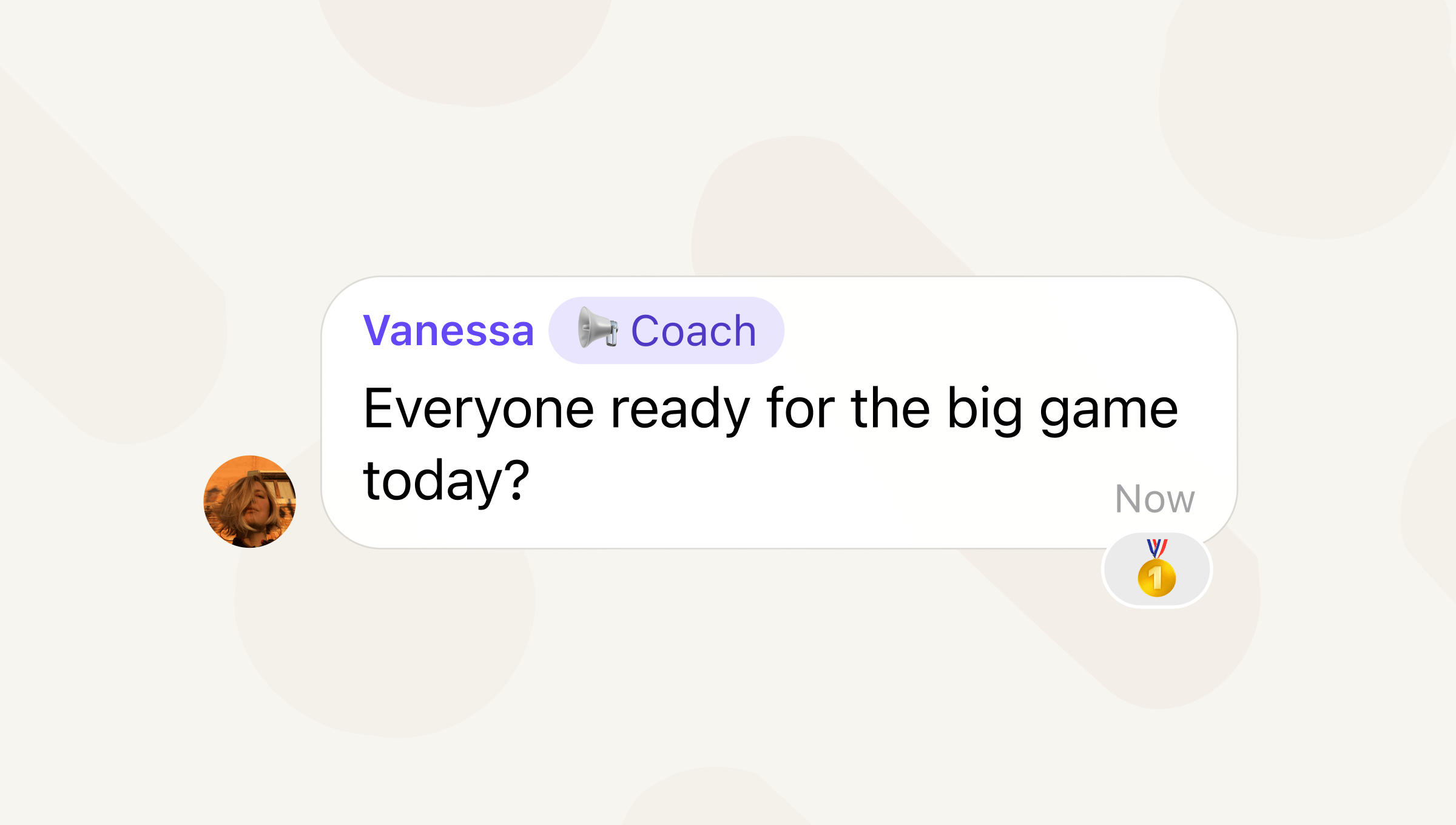
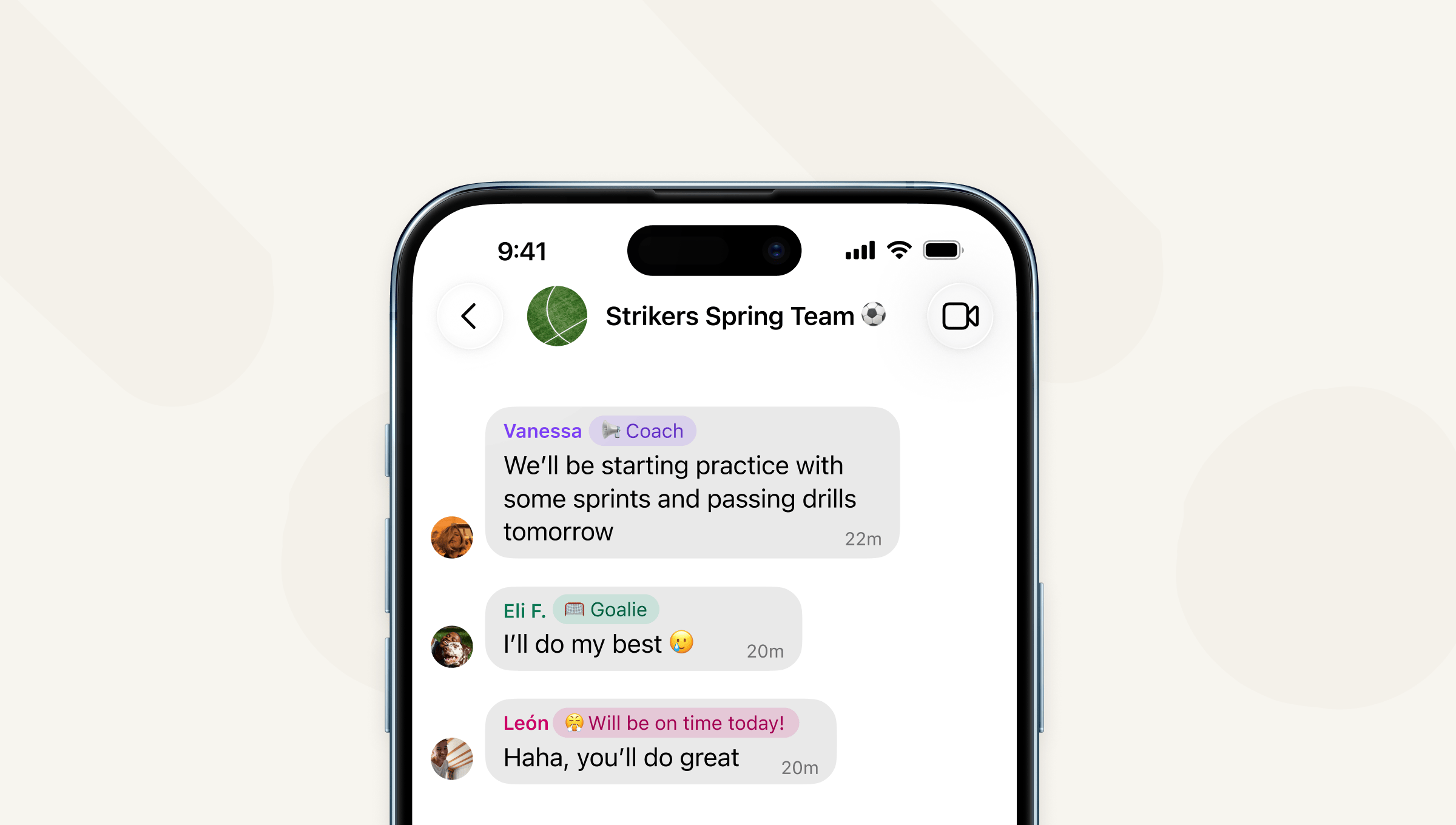
<p>A group member label appears next to a profile name in a group chat. It can be used to make responsibilities clear in a chat or share an inside joke that only the chat would understand. For example, a soccer team’s group chat might use group member labels so that everyone knows who the coach is, who’s playing goalie, or who <em>promises</em> to show up for practice on time.</p>

<p>Group member labels are end-to-end encrypted and only visible in the groups that you create them for. So, you can identify yourself as the coach for your soccer team without having to coach your book club or family chat.</p>

<p><img src="/blog/images/group-member-labels-1.png" alt="A screenshot of the &quot;Strikers Spring Team&quot; group chat, showing three group members with different member labels: &quot;Coach,&quot; &quot;Goalie,&quot; and &quot;Will be on time today!&quot;" /></p>

<p>Unlike being a group admin, creating a group member label does not give you any special abilities in that group chat, it’s purely a way to describe yourself to the other members of the chat. And you can create different member labels for all of your different group chats if you like.</p>

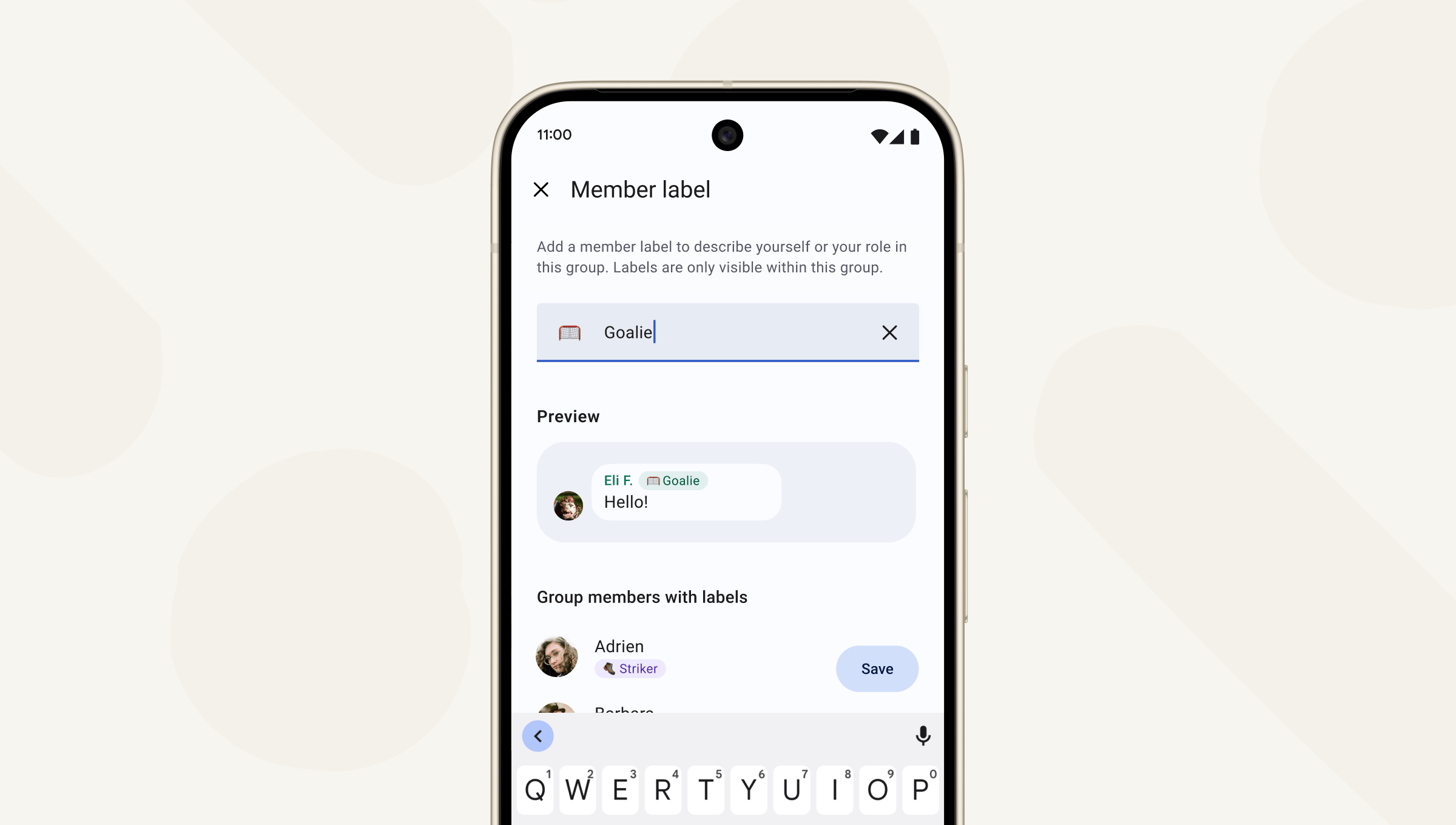
<p>To create a group member label, tap on the group icon to pull up the group details page and tap “Member label.”</p>

<p><img src="/blog/images/group-member-labels-2.png" alt="A screenshot displaying the interface to create a group member label." /></p>

<p>By default, all members of a group can create a label for themselves. But admins can make group member labels available only for admins by going to Group Settings &gt; Permissions. If admins toggle off group member label permissions for non-admins, any non-admin member labels will be removed. People can only create member labels for themselves, not anyone else.</p>

<p>As Signal grows, people will use it for more purposes and in more contexts. Group member labels make it easier to see the different roles you play in the varied group chats you’re part of in Signal.</p>

<p>Try out group member labels now, available in the latest version of Signal for Android, Desktop, and iOS and keep your app updated because we’ve got more features for groups coming in the near future.</p>]]></content><author><name>Nina Berman|nina-signal</name></author><category term="blog" /><summary type="html"><![CDATA[]]></summary><media:thumbnail xmlns:media="http://search.yahoo.com/mrss/" url="https://signal.org/blog/images/group-member-labels-opengraph.png" /><media:content medium="image" url="https://signal.org/blog/images/group-member-labels-opengraph.png" xmlns:media="http://search.yahoo.com/mrss/" /></entry><entry><title type="html">Government Requests » Grand jury subpoena for Signal user data in the United States District Court for the District of Columbia</title><link href="https://signal.org/bigbrother/district-of-columbia/" rel="alternate" type="text/html" title="Government Requests » Grand jury subpoena for Signal user data in the United States District Court for the District of Columbia" /><published>2026-03-06T00:00:00+00:00</published><updated>2026-03-06T00:00:00+00:00</updated><id>https://signal.org/bigbrother/district-of-columbia</id><content type="html" xml:base="https://signal.org/bigbrother/district-of-columbia/"><![CDATA[<p>Signal end-to-end encrypts both content and metadata by default far beyond most of our peers. Our aim is to have access to as close to no data as possible, meaning that we have a fraction of the personal information compared to the average communications service. We simply don’t have access to things like messages, calls, profile information, group information, contacts, stories, call logs, and many other kinds of content and metadata, and we cannot share data in response to valid legal requests that we never had in the first place.</p>

<p>XXXXX</p>

<p>This doesn’t mean we don’t receive subpoenas and other requests for data. While we fight these, we are sometimes forced to comply. And when we are, we work to unseal these and make them available in the name of transparency.</p>

<p>We received a grand jury subpoena from the United States District Court for the District of Columbia which requested customer or subscriber account information for a list of 37 phone numbers. Specifically, it asked us to produce the account creation date and time, as well as the last connection date and time for those accounts. This showcases increasing awareness of the remarkably little information Signal can make available in response to such requests in the first place.</p>

<p>Our response to the subpoena was predictably brief:</p>
<ul>
  <li>Of the <strong>37 accounts</strong> for which information was sought, seven accounts did not exist.</li>
  <li>For <strong>24 accounts</strong>, we did not possess any responsive information for the time period at issue.</li>
  <li>For the remaining <strong>6 accounts</strong>, we provided the responsive information for the time period at issue.</li>
</ul>

<p>Initially, this request was accompanied by a nondisclosure order (NDO). That order directed Signal and its employees not to disclose the existence of the subpoena to any other person for a period of one year. Thanks to the efforts of the ACLU, in late 2025, the nondisclosure order was modified to allow Signal to disclose the fact that it received the subpoena and NDO, provided that we publish a version containing agreed-upon redactions.</p>

<p>We’d like to thank the American Civil Liberties Union (ACLU), which represented Signal for the purposes of responding to this order. We are especially grateful for the ongoing assistance of our counsels for this response, Jennifer Stisa Granick and Brett Max Kaufman.</p>

<p>The relevant documents for this request can be found below.</p>

<div class="row">
  <div class="col-md-4">
    <h2>Grand jury subpoena and nondisclosure order</h2>
  </div>
  <div class="col-md-8">
    <iframe src="/bigbrother/pdfjs/web/viewer.html?file=/bigbrother/documents/2025-07-01-ddc-grand-jury-subpoena.pdf" width="100%" height="800px" style="border: none;"></iframe>
  </div>
</div>

<div class="row">
  <div class="col-md-4">
    <h2>ACLU cover letter</h2>
  </div>
  <div class="col-md-8">
    <iframe src="/bigbrother/pdfjs/web/viewer.html?file=/bigbrother/documents/2025-08-04-ddc-grand-jury-response-cover-letter.pdf" width="100%" height="800px" style="border: none;"></iframe>
  </div>
</div>

<div class="row">
  <div class="col-md-4">
    <h2>Our response</h2>
  </div>
  <div class="col-md-8">
    <iframe src="/bigbrother/pdfjs/web/viewer.html?file=/bigbrother/documents/2025-08-04-ddc-grand-jury-response.pdf" width="100%" height="800px" style="border: none;"></iframe>
  </div>
</div>

<div class="row">
  <div class="col-md-4">
    <h2>Revised nondisclosure order and unsealing order</h2>
  </div>
  <div class="col-md-8">
    <iframe src="/bigbrother/pdfjs/web/viewer.html?file=/bigbrother/documents/2025-08-20-ddc-grand-jury-revised-ndo-and-unsealing-order.pdf" width="100%" height="800px" style="border: none;"></iframe>
  </div>
</div>]]></content><author><name></name></author><category term="bigbrother" /><summary type="html"><![CDATA[Signal end-to-end encrypts both content and metadata by default far beyond most of our peers. Our aim is to have access to as close to no data as possible, meaning that we have a fraction of the personal information compared to the average communications service. We simply don’t have access to things like messages, calls, profile information, group information, contacts, stories, call logs, and many other kinds of content and metadata, and we cannot share data in response to valid legal requests that we never had in the first place.]]></summary></entry><entry><title type="html">Blog » Put a pin in it</title><link href="https://signal.org/blog/pinned-messages/" rel="alternate" type="text/html" title="Blog » Put a pin in it" /><published>2026-01-29T00:00:00+00:00</published><updated>2026-01-29T00:00:00+00:00</updated><id>https://signal.org/blog/pinned-messages</id><content type="html" xml:base="https://signal.org/blog/pinned-messages/"><![CDATA[<p><img src="/blog/images/pinned-messages-header.png" alt="A screenshot of a group chat displaying a pinned message at the top of the thread." /></p>

<p>Your most frequently asked questions, dinner reservations, and vacation itineraries are already top of mind. Now they can be top of chat as well.</p>

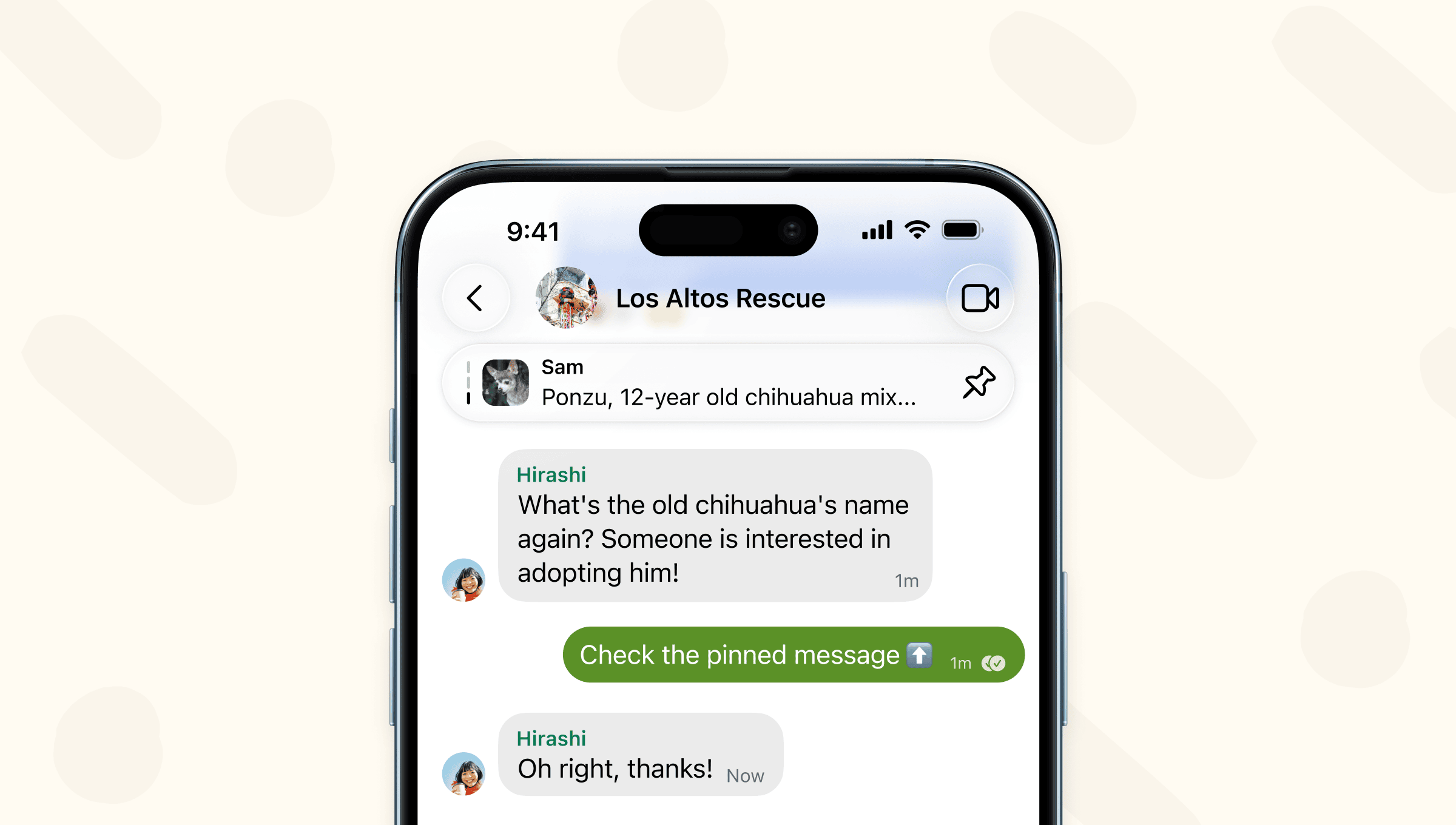
<p>In the latest version of Signal rolling out now, you can pin your most important messages to the top of your 1-1 and group chats.</p>

<p>XXXXX</p>

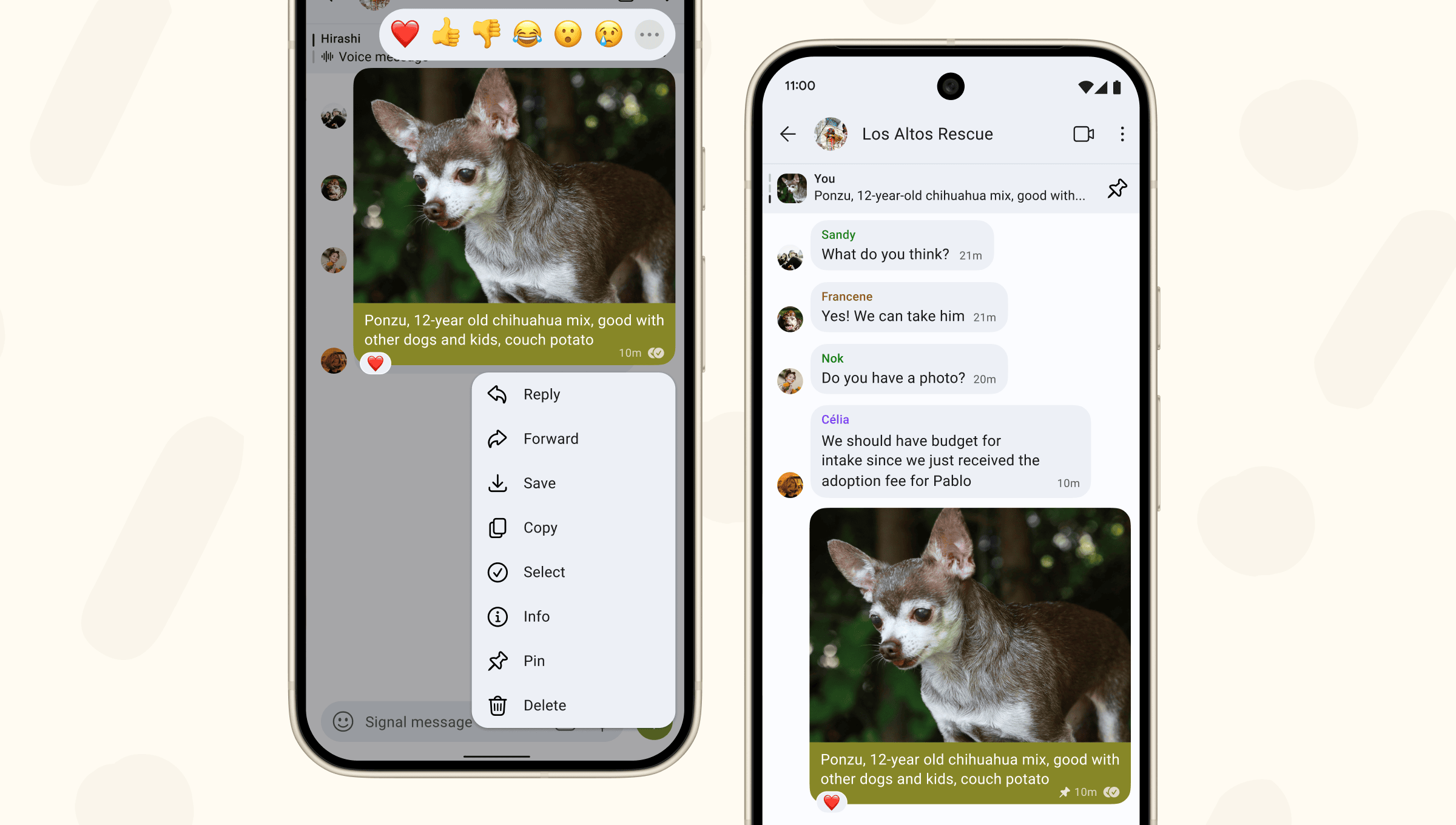
<p>To pin a message (or photo, poll, file), long press on that message. When you pin a message, other members of the chat will see it pinned as well if they were in the chat at the time the message was sent.</p>

<p><img src="/blog/images/pinned-messages-screenshots.png" alt="Side-by-side screenshots showing a message being pinned, and the way the message appears after it has been pinned." /></p>

<p>Chats can have up to 3 pinned messages at once. Group admins can configure who is allowed to pin messages in group settings.</p>

<p>When pinning a message, you’ll select how long you want to keep that message pinned to the top of the chat: 24 hours, 7 days, 30 days, or forever. The message will automatically unpin after the timeframe elapses. Or, if you want to unpin a message earlier, tap the pin icon to manually unpin.</p>

<p>If you or someone else pins a message after the chat already has the maximum 3 messages pinned, the message that’s been pinned the longest will automatically be unpinned to make room.</p>

<p>You won’t see a pinned message if you don’t have the original message in your chat history. Commonly this would happen if you join a group after the message was sent or if you deleted the original message. Disappearing messages will be unpinned when their timer expires and the message is removed from the chat.</p>

<p>To try out new features before they launch and to join the community providing early crucial feedback, join our <a href="https://support.signal.org/hc/en-us/articles/360007318471-Signal-Beta">beta program</a>.</p>]]></content><author><name>Nina Berman|nina-signal</name></author><category term="blog" /><summary type="html"><![CDATA[]]></summary><media:thumbnail xmlns:media="http://search.yahoo.com/mrss/" url="https://signal.org/blog/images/pinned-messages-opengraph.png" /><media:content medium="image" url="https://signal.org/blog/images/pinned-messages-opengraph.png" xmlns:media="http://search.yahoo.com/mrss/" /></entry><entry><title type="html">Blog » Signal Polls: Yes, no, maybe (yes!)</title><link href="https://signal.org/blog/polls/" rel="alternate" type="text/html" title="Blog » Signal Polls: Yes, no, maybe (yes!)" /><published>2025-11-19T00:00:00+00:00</published><updated>2025-11-19T00:00:00+00:00</updated><id>https://signal.org/blog/polls</id><content type="html" xml:base="https://signal.org/blog/polls/"><![CDATA[<p><img src="/blog/images/polls-header.png" alt="A stylized representation of a Signal poll." /></p>

<p>Signal polling: An easier way to see what your group chat really thinks and feels.</p>

<p>XXXXX</p>

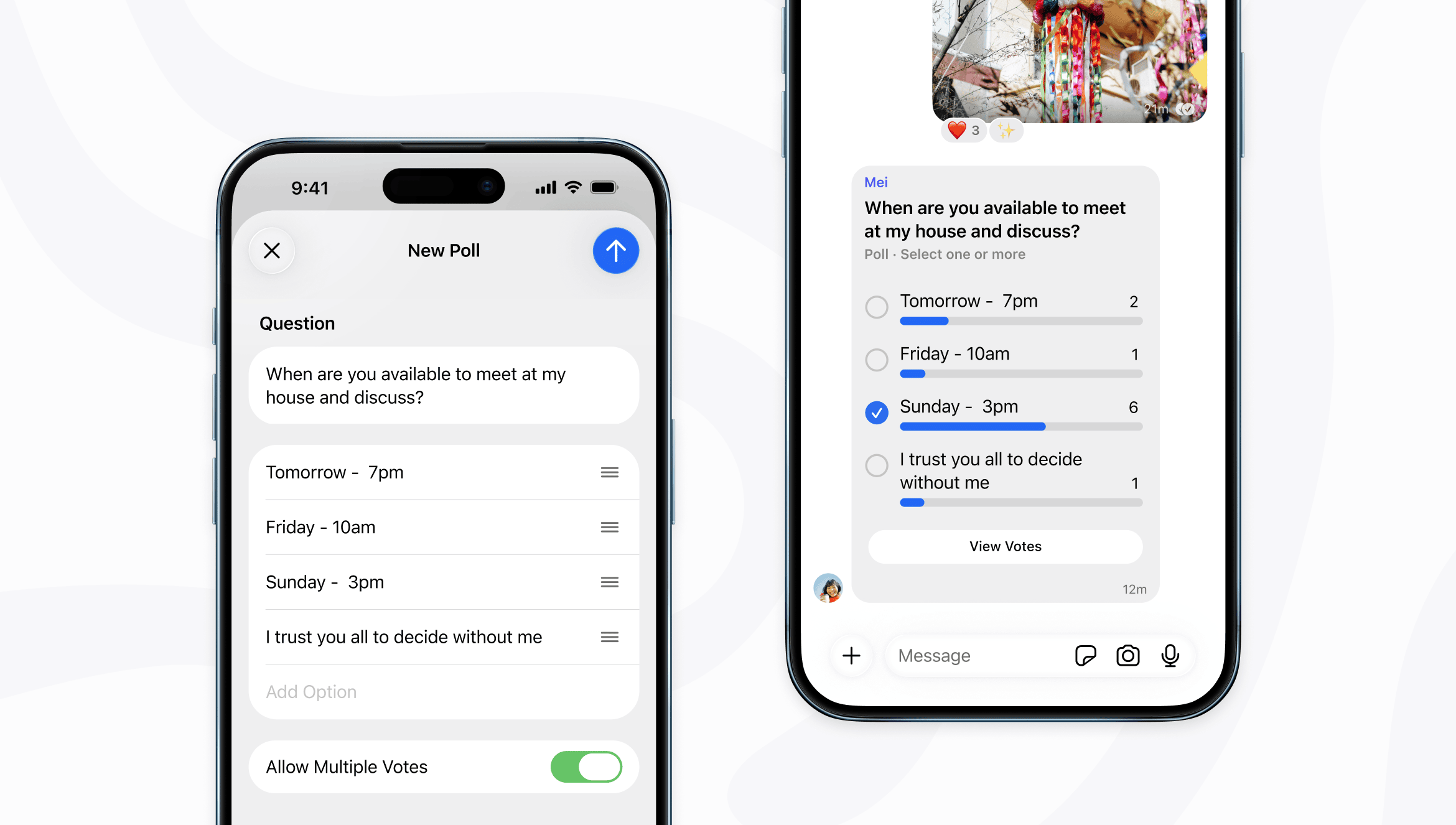
<p>Find the best time to schedule a meeting, check dietary restrictions before dinner, and seek counsel on whether to text your ex.</p>

<p><img src="/blog/images/polls-screenshots.png" alt="Side-by-side screenshots of a new Signal poll being created on the left, and the same poll appearing in a group chat on the right." /></p>

<p>To create a poll, tap the + button when composing a message to a group chat. Then fill in your poll’s question and up to 10 options for people to choose between. Once you make the poll, you can decide if people can vote for multiple options in your poll or just one. When you’re ready, end the poll to stop collecting responses by tapping “View Votes.”</p>

<p>Polls are end-to-end encrypted and only visible to members of the group chat, but poll responses are not anonymous and anyone can see who has voted for which option in a poll. Stand proudly in your choices and preferences!</p>

<p>Polls are now available in the latest versions of Signal for Android, Desktop and iOS which are rolling out now.</p>]]></content><author><name>Nina Berman|nina-signal</name></author><category term="blog" /><summary type="html"><![CDATA[]]></summary><media:thumbnail xmlns:media="http://search.yahoo.com/mrss/" url="https://signal.org/blog/images/polls-opengraph.png" /><media:content medium="image" url="https://signal.org/blog/images/polls-opengraph.png" xmlns:media="http://search.yahoo.com/mrss/" /></entry><entry><title type="html">Blog » Signal Protocol and Post-Quantum Ratchets</title><link href="https://signal.org/blog/spqr/" rel="alternate" type="text/html" title="Blog » Signal Protocol and Post-Quantum Ratchets" /><published>2025-10-02T00:00:00+00:00</published><updated>2025-10-02T00:00:00+00:00</updated><id>https://signal.org/blog/spqr</id><content type="html" xml:base="https://signal.org/blog/spqr/"><![CDATA[<p><img src="/blog/images/spqr-header.png" alt="A stylized Signal logo inscribed with mathematical symbols representing a qubit." /></p>

<p>We are excited to announce a significant advancement in the security of the
Signal Protocol: the introduction of the Sparse Post Quantum Ratchet (SPQR).
This new ratchet enhances the Signal Protocol’s resilience against future
quantum computing threats while maintaining our existing security guarantees of
forward secrecy and post-compromise security.</p>

<p>XXXXX</p>

<p>The Signal Protocol is a set of cryptographic specifications that provides
end-to-end encryption for private communications exchanged daily by billions of
people around the world. After its publication in 2013, the open source Signal
Protocol was adopted not only by the Signal application but also by other major
messaging products. Technical information on the Signal Protocol can be found in
the specifications section of our <a href="/docs/">docs</a> site.</p>

<p>In a <a href="/blog/pqxdh/">previous blog post</a>, we announced the first step towards advancing
quantum resistance for the Signal Protocol: an upgrade called PQXDH that
incorporates quantum-resistent cryptographic secrets when chat sessions are
established in order to protect against <a href="https://en.wikipedia.org/wiki/Harvest_now%2C_decrypt_later">harvest-now-decrypt-later</a>
attacks that could allow current chat sessions to become compromised if a
sufficiently powerful quantum computer is developed in the future. However, the
Signal Protocol isn’t just about protecting cryptographic material and keys at
the beginning of a new chat or phone call; it’s also designed to minimize damage
and heal from compromise as that conversation continues.</p>

<p>We refer to these security goals as Forward Secrecy (FS) and Post-Compromise
Security (PCS). FS and PCS can be considered mirrors of each other: FS protects
past messages against future compromise, while PCS protects future messages from
past compromise. Today, we are happy to announce the next step in advancing
quantum resistance for the Signal Protocol: an additional regularly advancing
post-quantum ratchet called the Sparse Post Quantum Ratchet, or SPQR. On its
own, SPQR provides secure messaging that provably achieves these FS and PCS
guarantees in a quantum safe manner. We mix the output of this new ratcheting
protocol with Signal’s existing Double Ratchet, in a combination we refer to as
the Triple Ratchet.</p>

<p>What does this mean for you as a Signal user? First, when it comes to your
experience using the app, nothing changes. Second, because of how we’re rolling
this out and mixing it in with our existing encryption, eventually all of your
conversations will move to this new protocol without you needing to take any
action. Third, and most importantly, this protects your communications both now
and in the event that cryptographically relevant quantum computers eventually
become a reality, and it allows us to maintain our existing security guarantees
of forward secrecy and post-compromise security as we proactively prepare for
that new world.</p>

<h2 id="the-current-state-of-the-signal-protocol">The Current State of the Signal Protocol</h2>

<p>The original Signal ratchet uses hash functions for FS and a set of
elliptic-curve Diffie Hellman (ECDH) secret exchanges for PCS. The hash
functions are quantum safe, but elliptic-curve cryptography is not. An example
is in order: our favorite users, Alice and Bob, establish a long-term connection
and chat over it regularly. During that session’s lifetime, Alice and Bob
regularly agree on new ECDH secrets and use them to “ratchet” their session.
Mean ol’ Mallory records the entire (encrypted) communication, and really wants
to know what Alice and Bob are talking about.</p>

<p>The concept of a “ratchet” is crucial to our current non-quantum FS/PCS
protection. In the physical world, a ratchet is a mechanism that allows a gear
to rotate forward, but disallows rotation backwards. In the Signal Protocol, it
takes on a similar role. When Alice and Bob “ratchet” their session, they
replace the set of keys they were using prior with a new set based on both the
older secrets and a new one they agree upon. Given access to those new secrets,
though, there’s no (non-quantum) way to compute the older secrets. By being
“one-way”, this ratcheting mechanism provides FS.</p>

<p>The ECDH mechanism allows Alice and Bob to generate new, small (32 bytes) data
blobs and attach them to every message. Whenever each party receives a message
from the other, they can locally (and relatively cheaply) use this data blob to
agree on a new shared secret, then use that secret to ratchet their side of the
protocol. Crucially, ECDH also allows Alice and Bob to both agree on the new
secret without sending that secret itself over their session, and in fact
without sending anything over the session that Mallory could use to determine
it. <a href="https://en.wikipedia.org/wiki/Diffie%E2%80%93Hellman_key_exchange">This description of Diffie-Hellman key exchange</a> provides more
details on the concepts of such a key exchange, and
<a href="https://en.wikipedia.org/wiki/Elliptic-curve_Diffie%E2%80%93Hellman">this description of ECDH</a> provides specific details on the variant used
by the current Signal protocol.</p>

<p>Sometime midway through the lifetime of Alice and Bob’s session, Mallory
successfully breaches the defences of both Alice and Bob, gaining access to all
of the (current) secrets used for their session at the time of request. Alice
and Bob should have the benefits of Forward Secrecy - they’ve ratcheted sometime
recently before the compromise, so no messages earlier than their last ratchet
are accessible to Mallory, since ratcheting isn’t reversible. They also retain
the benefits of Post-Compromise Security. Their ratcheting after Mallory’s
secret access agrees upon new keys that can’t be gleaned just from the captured
data they pass between each other, re-securing the session.</p>

<p>Should Mallory have access to a quantum computer, though, things aren’t so
simple. Because elliptic curve cryptography is not quantum resistant, it’s
possible that Mallory could glean access to the secret that Alice and Bob agreed
upon, just by looking at the communication between them. Given this, Alice and
Bob’s session will never “heal”; Mallory’s access to their network traffic from
this point forward will allow her to decrypt all future communications.</p>

<h2 id="mixing-in-quantum-security">Mixing In Quantum Security</h2>

<p>In order to make our security guarantees stand up to quantum attacks, we need to
mix in secrets generated from quantum secure algorithms. In PQXDH, we did this
by performing an additional round of key agreement during the session-initiating
handshake, then mixing the resulting shared secret into the initial secret
material used to create Signal sessions. To handle FS and PCS, we need to do
continuous key agreement, where over the lifetime of a session we keep
generating new shared secrets and mixing those keys into our encryption keys.</p>

<p>Luckily there is a tool designed exactly for this purpose: the quantum-secure
Key-Encapsulation Mechanism (KEM). KEMs share similar behavior to the
Diffie-Hellman mechanisms we described earlier, where two clients provide each
other with information, eventually deciding on a shared secret, without anyone
who intercepts their communications being able to access that secret. However,
there is one important distinction for KEMs - they require ordered, asymmetric
messages to be passed between their clients. In ECDH, both clients send the
other some public parameters, and both combine these parameters with their
locally held secrets and come up with an identical shared secret. In the
<a href="https://csrc.nist.gov/pubs/fips/203/final">standardized</a> ML-KEM key-encapsulation mechanism, though, the initiating
client generates a pair of encapsulation key (EK) and decapsulation key (DK)
(analogous to a public and private key respectively) and sends the EK. The
receiving client receives it, generates a secret, and wraps it into a ciphertext
(CT) with that key. The initiating client receives that CT and decapsulates with
its previously generated DK. In the end, both clients have access to the new,
shared secret, just through slightly different means.</p>

<p>Wanting to integrate this quantum-secure key sharing into Signal, we could take
a simple, naive approach for each session. When Alice initiates a session with
Bob,</p>

<ul>
  <li>Alice, with every message she sends, sends an EK</li>
  <li>Bob, with every message he receives, generates a secret and a CT, and sends
the CT back</li>
  <li>Alice, on receiving a CT, extracts the secret with her DK and mixes it in</li>
</ul>

<p>This initially simple-looking approach, though, quickly runs into a number of
issues we’ll need to address to make our protocol actually robust. First,
encapsulation keys and CTs are large - over 1000 bytes each for ML-KEM 768,
compared to the 32 bytes required for ECDH. Second, while this protocol works
well when both clients are online, what happens when a client is offline? Or a
message is dropped or reordered? Or Alice wants to send 10 messages before Bob
wants to send one?</p>

<p>Some of these problems have well-understood solutions, but others have
trade-offs that may shine in certain circumstances but fall short in others.
Let’s dive in and come to some conclusions.</p>

<h2 id="who-wants-what-when">Who Wants What When</h2>

<p>How does Alice decide what to send based on what Bob needs next, and
vice versa? If Bob hasn’t received an EK yet, she shouldn’t send the next one.
What does Bob send when he hasn’t yet received an EK from Alice, or when he has,
but he’s already responded to it? This is a common problem when remote parties
send messages to communicate, so there’s a good, well-understood solution: a
state machine. Alice and Bob both keep track of “what state am I in”, and base
their decisions on that. When sending or receiving a message, they might also
change their state. For example:</p>

<ul>
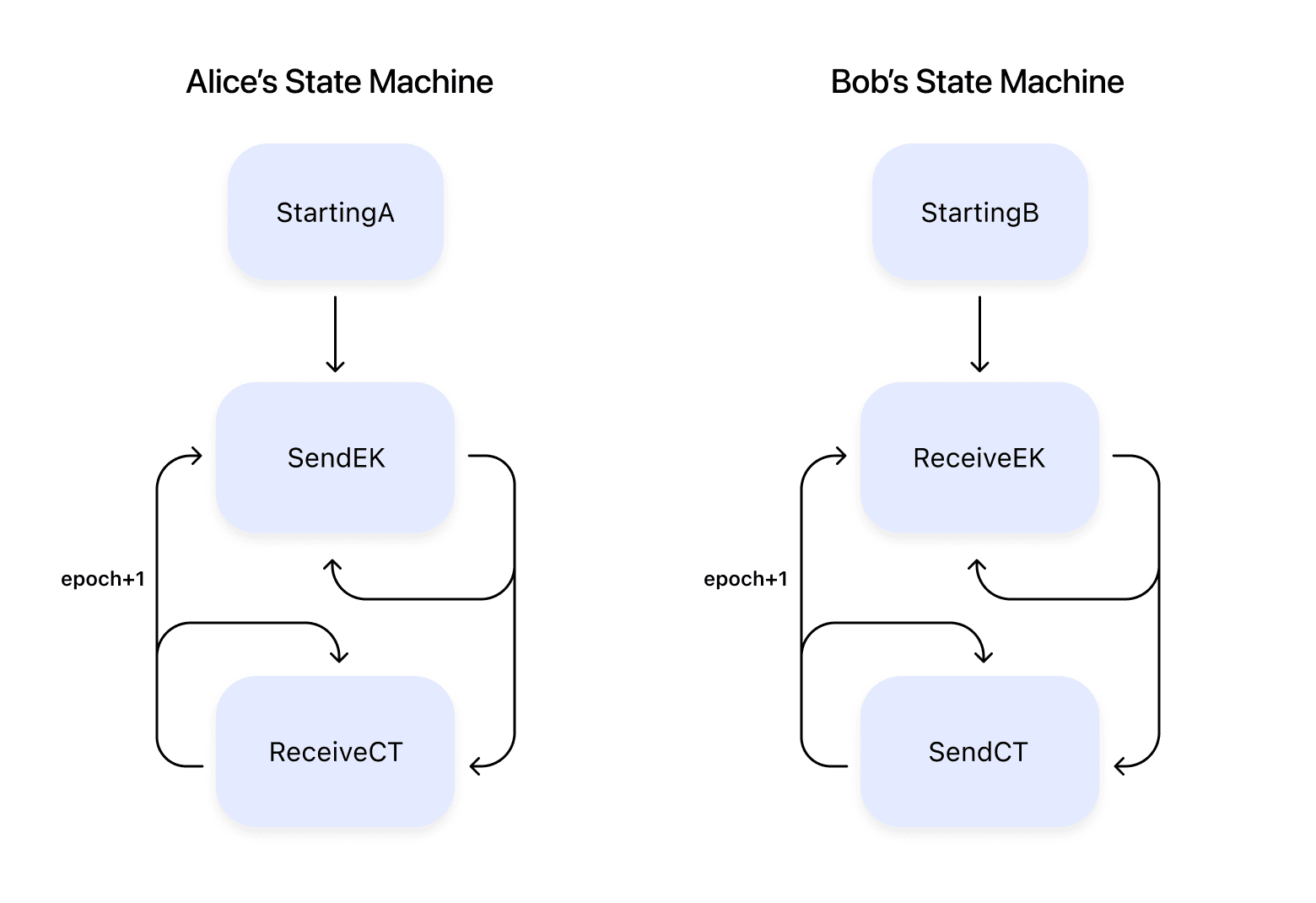
  <li>Alice wants to send a message, but she’s in a StartingA state, so she doesn’t
have an EK. So, she generates an EK/DK pair, stores them locally, and
transitions to the SendEK state</li>
  <li>Alice wants to send a message and is in the SendEK state. She sends the EK
along with the message</li>
  <li>Alice wants to send another message, but she’s still in the SendEK state. So,
she sends the EK with the new message as well</li>
  <li>Bob receives the message with the EK. He generates a secret and uses the EK to
create a CT. He transitions to the SendingCT state.</li>
  <li>Bob wants to send a message and he’s in the SendingCT state. He sends the CT
along with the message</li>
  <li>Bob wants to send a message and he’s in the SendingCT state. He sends the CT
along with the message</li>
  <li>… etc …</li>
</ul>

<p>By crafting a set of states and transitions, both sides can coordinate what’s
sent. Note, though, that even in this simple case, we see problems. For example,
we’re sending our (large) EK and (large) CT multiple times.</p>

<p><img src="/blog/images/spqr-3.png" alt="SPQR State Machine Diagram" /></p>

<h2 id="say-or-send-less">Say (or Send) Less</h2>

<p>We’ve already mentioned that the size of the data we’re sending has increased
pretty drastically, from 32 bytes to over 1000 per message. But bandwidth is
expensive, especially on consumer devices like client phones, that may be
anywhere in the world and have extremely varied costs for sending bytes over the
wire. So let’s discuss strategies for conserving that bandwidth.</p>

<p>First, the simplest approach - don’t send a new key with every message. Just,
for example, send with every 50 messages, or once a week, or every 50 messages
unless you haven’t sent a key in a week, or any other combination of options.
All of these approaches tend to work pretty well in online cases, where both
sides of a session are communicating in real-time with no message loss. But in
cases where one side is offline or loss can occur, they can be problematic.
Consider the case of “send a key if you haven’t sent one in a week”. If Bob has
been offline for 2 weeks, what does Alice do when she wants to send a message?
What happens if we can lose messages, and we lose the one in fifty that contains
a new key? Or, what happens if there’s an attacker in the middle that wants to
stop us from generating new secrets, and can look for messages that are 1000
bytes larger than the others and drop them, only allowing keyless messages
through?</p>

<p>Another method is to chunk up a message. Want to send 1000 bytes? Send 10 chunks
of 100 bytes each. Already sent 10 chunks? Resend the first chunk, then the
second, etc. This smooths out the total number of bytes sent, keeping individual
message sizes small and uniform. And often, loss of messages is handled. If
chunk 1 was lost, just wait for it to be resent. But it runs into an issue with
message loss - if chunk 99 was lost, the receiver has to wait for all of chunks
1-98 to be resent before it receives the chunk it missed. More importantly, if a
malicious middleman wants to stop keys from being decided upon, they could
always drop chunk 3, never allowing the full key to pass between the two
parties.</p>

<p>We can get around all of these issues using a concept called erasure codes.
Erasure codes work by breaking up a larger message into smaller chunks, then
sending those along. Let’s consider our 1000 byte message being sent as 100 byte
chunks again. After chunk #10 has been sent, the entirety of the original 1000
byte message has been sent along in cleartext. But rather than just send the
first chunk over again, erasure codes build up a new chunk #11, and #12, etc.
And they build them in such a way that, once the recipient receives any 10
chunks in any order, they’ll be able to reconstruct the original 1000 byte
message.</p>

<p>When we put this concept of erasure code chunks together with our previous state
machine, it gives us a way to send large blocks of data in small chunks, while
handling messages that are dropped. Crucially, this includes messages dropped by
a malicious middleman: since any N chunks can be used to recreate the original
message, a bad actor would need to drop all messages after #N-1 to disallow the
data to go through, forcing them into a complete (and highly noticeable) denial
of service. Now, if Alice wants to send an EK to Bob, Alice will:</p>

<ol>
  <li>Transition from the StartingA state to the SendingEK state, by generating a
new EK and chunking it</li>
  <li>While in the SendingEK state, send a new chunk of the EK along with any
messages she sends</li>
  <li>When she receives confirmation that the recipient has received the EK (when
she receives a chunk of CT), transition to the ReceivingCT state</li>
</ol>

<p>On Bob’s side, he will:</p>

<ol>
  <li>Transition from the StartingB state to the ReceivingEK state when he receives
its first EK chunk</li>
  <li>Keep receiving EK chunks until he has enough to reconstruct the EK</li>
  <li>At that point, reconstruct the EK, generate the CT, chunk the CT, and
transition to the SendingCT state</li>
  <li>From this point on, he will send a chunk of the CT with every message</li>
</ol>

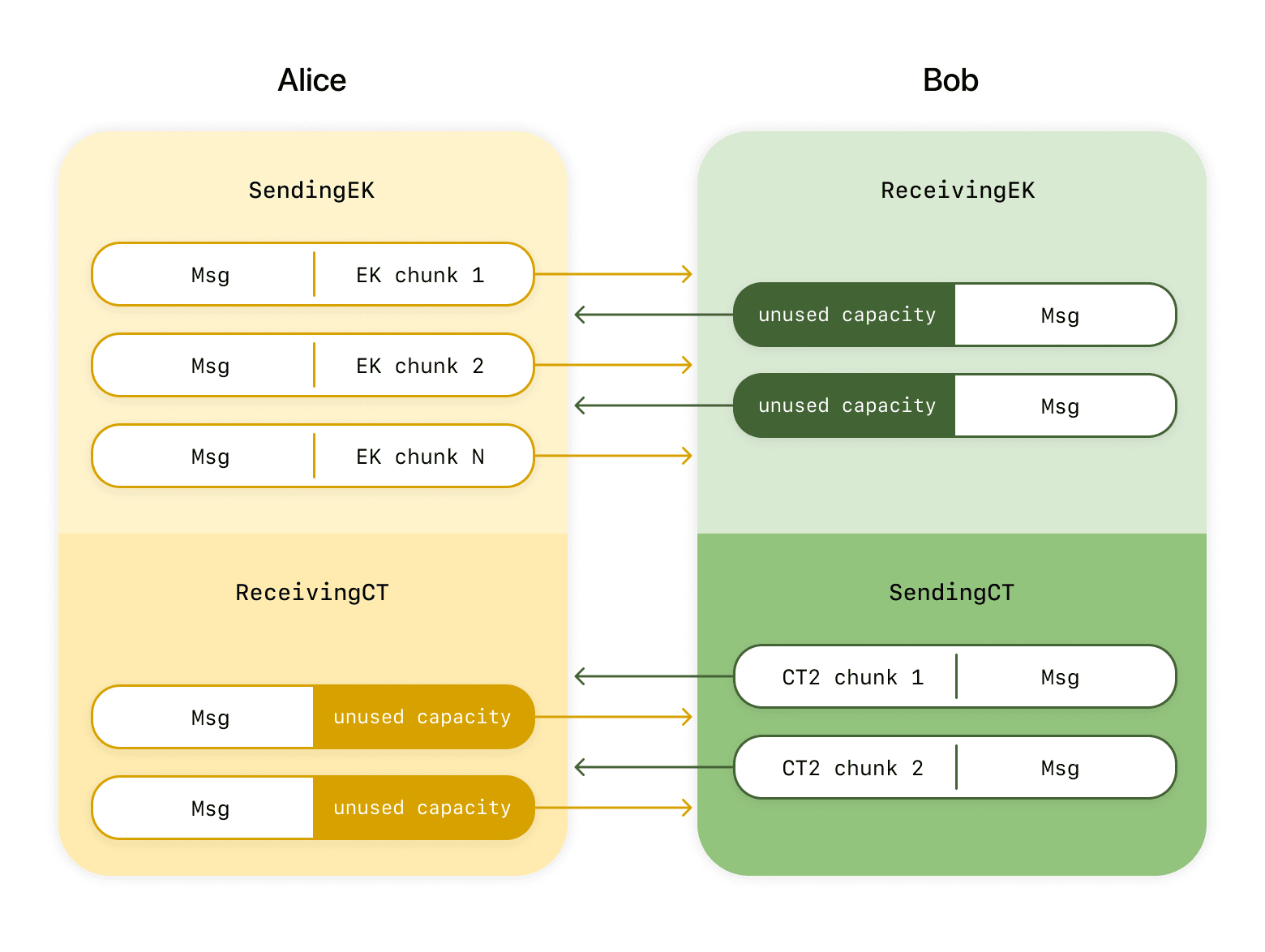
<p>One interesting way of looking at this protocol so far is to consider the
messages flowing from Alice to Bob as potential capacity for sending data
associated with post-quantum ratcheting: each message that we send, we could
also send additional data like a chunk of EK or of the CT. If we look at Bob’s
side, above, we notice that sometimes he’s using that capacity (IE: in step 4
when he’s sending CT chunks) and sometimes he’s not (if he sends a message to
Alice during step 2, he has no additional data to send). This capacity is pretty
limited, so using more of it gives us the potential to speed up our protocol and
agree on new secrets more frequently.</p>

<p><img src="/blog/images/spqr-1.png" alt="SPQR Flow Diagram illustrating how bandwidth consumption is optimized" /></p>

<h2 id="a-meditation-on-how-faster-isnt-always-better">A Meditation On How Faster Isn’t Always Better</h2>

<p>We want to generate shared secrets, then use them to secure messages. So, does
that mean that we want to generate shared secrets as fast as possible? Let’s
introduce a new term: an epoch. Alice and Bob start their sessions in epoch 0,
sending the EKs for epoch 1 (EK#1) and associated ciphertext (CT#1) to each
other. Once that process completes, they have a new shared secret they use to
enter epoch 1, after which all newly sent messages are protected by the new
secret. Each time they generate a new shared secret, they use it to enter a new
epoch. Surely, every time we enter a new epoch with a new shared secret, we
protect messages before that secret (FS) and after that secret (PCS), so faster
generation is better? It seems simple, but there’s an interesting complexity
here that deserves attention.</p>

<p>First, let’s discuss how to do things faster. Right now, there’s a lot of
capacity we’re not using: Bob sends nothing while Alice sends an EK, and Alice
sends nothing while Bob sends a CT. Speeding this up isn’t actually that hard.
Let’s change things so that Alice sends EK#1, and once Bob acknowledges its
receipt, Alice immediately generates and sends EK#2. And once she notices Bob
has received that, she generates and sends EK#3, etc. Whenever Alice sends a new
message, she always has data to send along with it (new EK chunks), so she’s
using its full capacity. Bob doesn’t always have a new CT to send, but he is
receiving EKs as fast as Alice can send them, so he often has a new CT to send
along.</p>

<p>But now let’s consider what happens when an attacker gains access to Alice.
Let’s say that Alice has sent EK#1 and EK#2 to Bob, and she’s in the process of
sending EK#3. Bob has acknowledged receipt of EK#1 and EK#2, but he’s still in
the process of sending CT#1, since in this case Bob sends fewer messages to
Alice than vice versa. Because Alice has already generated 3 EKs she hasn’t used,
Alice needs to keep the associated DK#1, DK#2, and DK#3 around. So, if at this
point someone maliciously gains control of Alice’s device, they gain access to
both the secrets associated with the current epoch (here, epoch 0) and to the
DKs necessary to reconstruct the secrets to other epochs (here, epochs 1, 2,
and 3) using only the over-the-wire CT that Bob has yet to send. This is a big
problem: by generating secrets early, we’ve actually made the in-progress epochs
and any messages that will be sent within them less secure against this
single-point-in-time breach.</p>

<p>To test this out, we at Signal built a number of different state machines, each
sending different sets of data either in parallel or serially. We then ran these
state machines in numerous simulations, varying things like the ratio of
messages sent by Alice vs Bob, the amount of data loss or reordering, etc. And
while running these simulations, we tracked what epochs’ secrets were exposed at
any point in time, assuming an attacker were to breach either Alice’s or Bob’s
secret store. The results showed that, in general, while simulations that
handled multiple epochs’ secrets in parallel (IE: by sending EK#2 before receipt
of CT#1) did generate new epochs more quickly, they actually made more messages
vulnerable to a single breach.</p>

<h2 id="but-lets-still-be-efficient">But Let’s Still Be Efficient</h2>

<p>This still leaves us with a problem, though: the capacity present in messages we
send in either direction is still a precious resource, and we want to use it as
efficiently as possible. And our simple approach of Alice’s “send EK, receive
CT, repeat” and Bob’s “receive EK, send CT, repeat” leaves lots of time where
Alice and Bob have nothing to send, should that capacity be available.</p>

<p>To improve our use of our sending capacity, we decided to take a harder look
into the ML-KEM algorithm we’re using to share secrets, to see if there was room
to improve. Let’s break things down more and share some actual specifics on the
ML-KEM algorithm.</p>

<ol>
  <li>Alice generates an EK of 1184 bytes to send to Bob, and an associated DK</li>
  <li>Bob receives the EK</li>
  <li>Bob samples a new shared secret (32 bytes), which he encrypts with EK into a
CT of 1088 bytes to send to Alice</li>
  <li>Alice receives the CT, uses the DK to decrypt it, and now also has access to
the 32 byte shared secret</li>
</ol>

<p>Diving in further, we can break out step #3 into some sub-steps</p>

<ol>
  <li>Alice generates an EK of 1184 bytes to send to Bob, and an associated DK</li>
  <li>Bob receives the EK</li>
  <li>Bob samples a new shared secret (32 bytes), which he encrypts with EK into a
CT of 1088 bytes to send to Alice<sup id="fnref:1"><a href="#fn:1" class="footnote" rel="footnote" role="doc-noteref">1</a></sup>
    <ol type="a">
  <li>
    Bob creates a new shared secret S and sampled randomness R by sampling
    entropy and combining it with a hash of EK
  </li>
  <li>Bob hashes the EK into a Hash</li>
  <li>Bob pulls 32 bytes of the EK, a Seed</li>
  <li>Bob uses the Seed and R to generate the majority of the CT</li>
  <li>Bob then uses S and EK to generate the last portion of the CT</li>
</ol>
  </li>
  <li>Alice receives the CT, uses the DK to decrypt it, and now also has access to
the 32 byte shared secret</li>
</ol>

<p>Step 3.d, which generates 960 bytes of the 1088-byte CT, only needs 64 bytes of
input: a Seed that’s 32 of EK’s bytes, and the hash of EK, which is an
additional 32. If we combine these values and send them first, then most of EK
and most of the CT can be sent in parallel from Alice to Bob and Bob to Alice
respectively. Our more complicated but more efficient secret sharing now looks
like this:</p>

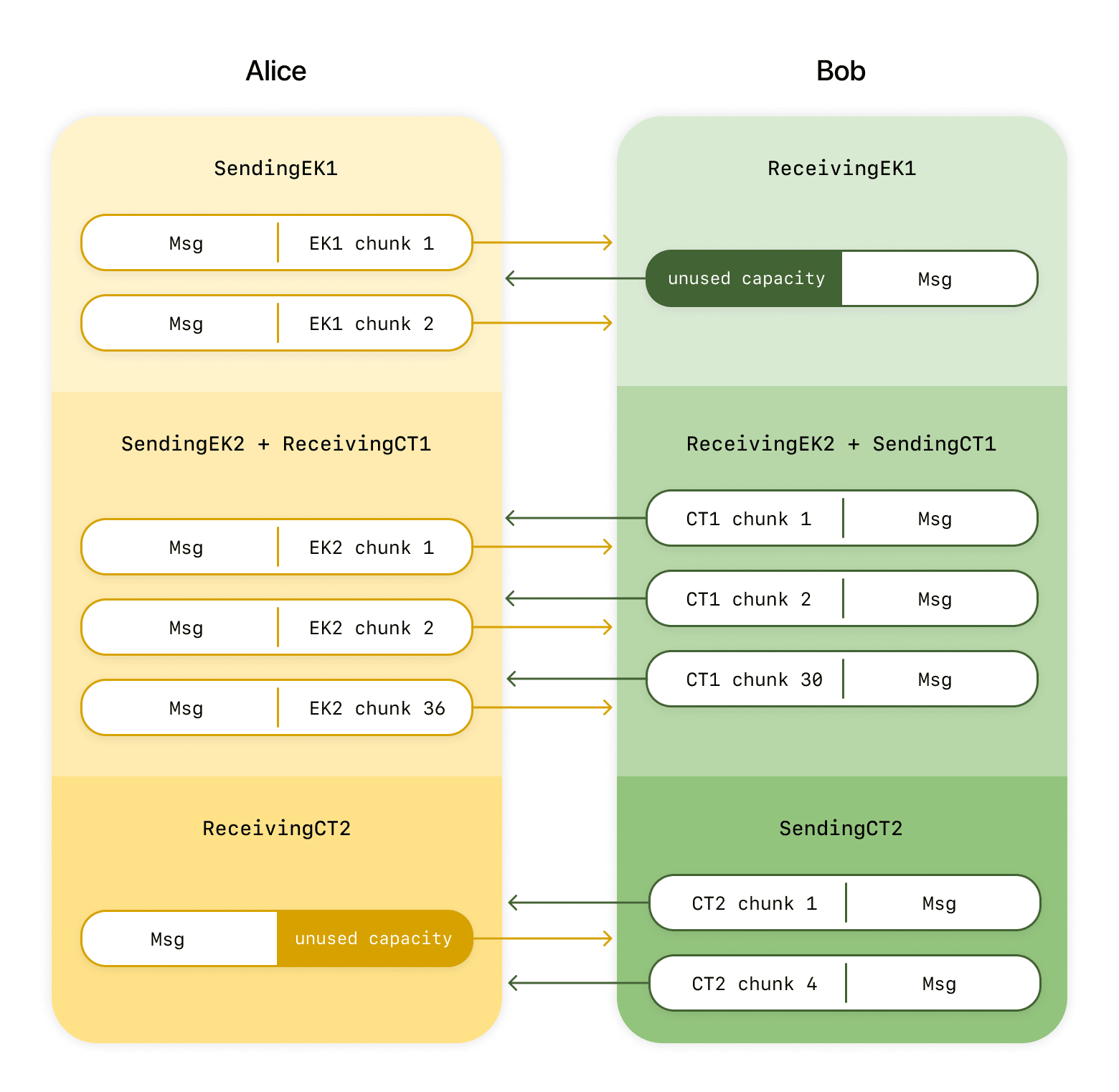
<ol>
  <li>Alice generates EK and DK. Alice extracts the 32-byte Seed from EK</li>
  <li>Alice sends 64 bytes EK<sub>1</sub> (Seed + Hash(EK)) to Bob. Bob sends
nothing during this time.</li>
  <li>Bob receives the Seed and Hash, and generates the first, largest part of the
CT from them (CT<sub>1</sub>)</li>
  <li>After this point, Alice sends EK<sub>2</sub> (the rest of the EK minus the
Seed), while Bob sends CT<sub>1</sub></li>
  <li>Bob eventually receives EK<sub>2</sub>, and uses it to generate the final
portion of the CT (CT<sub>2</sub>)</li>
  <li>Once Alice tells Bob that she has received all of CT<sub>1</sub>, Bob sends
Alice CT<sub>2</sub>. Alice sends nothing during this time.</li>
  <li>With both sides having all of the pieces of EK and the CT that they need,
they extract their shared secret and increment their epoch</li>
</ol>

<p>There are still places in this algorithm (specifically steps 2 and 6) where one
side has nothing to send. But during those times, the other side has only a very
small amount of information to send, so the duration of those steps is minimal
compared to the rest of the process. Specifically, while the full EK is 37
chunks and the full CT is 34, the two pieces of the new protocol which must be
sent without data being received (EK<sub>1</sub> and CT<sub>2</sub>) are 2 and 4
chunks respectively, while the pieces that can be sent while also receiving
(EK<sub>2</sub> and CT<sub>1</sub>) are the bulk of the data, at 36 and 30
chunks respectively. Far more of our sending capacity is actually used with this
approach.</p>

<p><img src="/blog/images/spqr-2.png" alt="SPQR Flow Diagram showing improved bandwidth efficiency" /></p>

<p>Remember that all of this is just to perform a quantum-safe key exchange that
gives us a secret we can mix into the bigger protocol. To help us organize our
code, our security proofs, and our understanding better we treat this process as
a standalone protocol that we call <a href="/docs/specifications/mlkembraid/">the ML-KEM Braid</a>.</p>

<p>This work was greatly aided by the authors of the <a href="https://crates.io/crates/libcrux-ml-kem">libcrux-ml-kem</a> Rust
library, who graciously exposed the APIs necessary to work with this incremental
version of ML-KEM 768. With this approach completed, we’ve been able to really
efficiently use the sending capacity of messages sent between two parties to
share secrets as quickly as possible without exposing secrets from multiple
epochs to potential attackers.</p>

<h2 id="mixing-things-up---the-triple-ratchet">Mixing Things Up - The Triple Ratchet</h2>

<p>There are plenty of details to add to make sure that we reached every corner -
check those out in our <a href="/docs/">online protocol documentation</a> - but this basic
idea lets us build secure messaging that has post-quantum FS and PCS without
using up anyone’s data. We’re not done, though! Remember, at the beginning of
this post we said we wanted post-quantum security without taking away our
existing guarantees.</p>

<p>While today’s Double Ratchet may not be quantum safe, it provides a high level
of security today and we believe it will continue to be strong well into the
future. We aren’t going to take that away from our users. So what can we do?</p>

<p>Our answer ends up being really simple: we run both the Double Ratchet and the
Sparse Post Quantum Ratchet alongside each other and mix their keys together,
into what we’re calling the Triple Ratchet protocol. When you want to send a
message you ask both the Double Ratchet and SPQR “What encryption key should I
use for the next message?” and they will both give you a key (along with some
other data you need to put in a message header). Instead of either key being
used directly, both are passed into a Key Derivation Function - a special
function that takes random-enough inputs and produces a secure cryptographic key
that’s as long as you need. This gives you a new “mixed” key that has hybrid
security. An attacker has to break both our elliptic curve and ML-KEM to even be
able to distinguish this key from random bits. We use that mixed key to encrypt
our message.</p>

<p>Receiving messages is just as easy. We take the message header - remember it has
some extra data in it - and send it to the Double Ratchet and SPQR and ask them
“What key should I use to decrypt a message with this header?” They both return
their keys and you feed them both into that Key Derivation Function to get your
decryption key. After that, everything proceeds just like it always has.</p>

<h2 id="heterogeneous-rollout">Heterogeneous Rollout</h2>

<p>So we’ve got this new, snazzy protocol, and we want to roll it out to all of our
users across all of their devices… but none of the devices currently support
that protocol. We roll it out to Alice, and Alice tries to talk to Bob, but
Alice speaks SPQR and Bob doesn’t. Or we roll it out to Bob, but Alice wants to
talk to Bob and Alice doesn’t know the new protocol Bob wants to use. How do we
make this work?</p>

<p>Let’s talk about the simplest option: allowing downgrades. Alice tries to
establish a session with Bob using SPQR and sends a message over it. Bob fails
to read the message and establish the session, because Bob hasn’t been upgraded
yet. Bob sends Alice an error, so Alice has to try again. This sounds fine, but
in practice it’s not tenable. Consider what happens if Alice and Bob aren’t
online at the same time… Alice sends a message at 1am, then shuts down. Bob
starts up at 3am, sends an error, then shuts down. Alice gets that error when
she restarts at 5am, then resends. Bob starts up at 7am and finally gets the
message he should have received at 3am, 4 hours behind schedule.</p>

<p>To handle this, we designed the SPQR protocol to allow itself to downgrade to
not being used. When Alice sends her first message, she attaches the SPQR data
she would need to start up negotiation of the protocol. Noticing that downgrades
are allowed for this session, Alice doesn’t mix any SPQR key material into the
message yet. Bob ignores that data, because it’s in a location he glosses over,
but since there’s no mixed in keys yet, he can still decrypt the message. He
sends a response that lacks SPQR data (since he doesn’t yet know how to fill it
in), which Alice receives. Alice sees a message without SPQR data, and
understands that Bob doesn’t speak SPQR yet. So, she downgrades to not using it
for that session, and they happily talk without SPQR protection.</p>

<p>There’s some scary potential problems here… let’s work through them. First
off, can a malicious middleman force a downgrade and disallow Alice and Bob from
using SPQR, even if both of them are able to? We protect against that by having
the SPQR data attached to the message be MAC’d by the message-wide
authentication code - a middleman can’t remove it without altering the whole
message in such a way that the other party sees it, even if that other party
doesn’t speak SPQR. Second, could some error cause messages to accidentally
downgrade sometime later in their lifecycle, due either to bugs in the code or
malicious activity? Crucially, SPQR only allows a downgrade when it first
receives a message from a remote party. So, Bob can only downgrade if he
receives his first message from Alice and notices that she doesn’t support SPQR,
and Alice will only downgrade if she receives her first reply from Bob and
notices that he doesn’t. After that first back-and-forth, SPQR is locked in and
used for the remainder of the session.</p>

<p>Finally, those familiar with Signal’s internal workings might note that Signal
sessions last a really long time, potentially years. Can we ever say “every
session is protected by SPQR”, given that SPQR is only added to new sessions as
they’re being initiated? To accomplish this, Signal will eventually (once all
clients support the new protocol) roll out a code change that enforces SPQR for
all sessions, and that archives all sessions which don’t yet have that
protection. After the full rollout of that future update, we’ll be able to
confidently assert complete coverage of SPQR.</p>

<p>One nice benefit to setting up this “maybe downgrade if the other side doesn’t
support things” approach is that it also sets us up for the future: the same
mechanisms that allow us to choose between SPQR or no-SPQR are designed to also
allow us to upgrade from SPQR to some far-future (as yet unimagined) SPQRv2.</p>

<h2 id="making-sure-we-get-it-right">Making Sure We Get It Right</h2>

<p>Complex protocols require extraordinary care. We have to ensure that the new
protocol doesn’t lose any of the security guarantees the Double Ratchet gives
us. We have to ensure that we actually get the post-quantum protection we’re
aiming for. And even then, after we have full confidence in the protocol, we
have to make sure that our implementation is correct and robust and stays that
way as we maintain it. This is a tall order.</p>

<p>To make sure we got this right, we started by building the protocol on a firm
foundation of fundamental research. We built on the years of research the
academic community has put into secure messaging and we collaborated with
researchers from PQShield, AIST, and NYU to explore what was possible with
post-quantum secure messaging. In <a href="https://eprint.iacr.org/2025/078">a paper at Eurocrypt 25</a> we
introduced erasure code based chunking and proposed the high-level Triple
Ratchet protocol, proving that it gave us the post-quantum security we wanted
without taking away any of the security of the classic Double Ratchet. In
<a href="https://www.usenix.org/system/files/usenixsecurity25-auerbach.pdf">a follow up paper at USENIX 25</a>, we observed that there are many
different ways to design a post-quantum ratchet protocol and we need to pick the
one that protects user messages the best. We introduced and analyzed six
different protocols and two stood out: one is essentially SPQR, the other is a
protocol using a new KEM, called Katana, that we designed just for ratcheting.
That second one is exciting, but we want to stick to standards to start!</p>

<h2 id="formal-verification-from-the-start">Formal Verification From the Start</h2>

<p>This research gave us the framework to think about protocol design and prove
protocols are secure, but there is a big leap from an academic paper to code.
Already when designing <a href="/blog/pqxdh/">PQXDH</a> - a much simpler protocol! -
<a href="https://www.usenix.org/system/files/usenixsecurity24-bhargavan.pdf">we found that formal verification was an important tool for getting the details right</a>.
With the Triple Ratchet we partnered with Cryspen and made formal verification
part of the process from the beginning.</p>

<p>As we kept finding better protocol candidates - and we implemented around a
dozen of them - we modeled them in <a href="https://bblanche.gitlabpages.inria.fr/proverif/">ProVerif</a> to prove that they had
the security properties we needed. Rather than wrapping up a protocol design and
performing formal verification as a last step we made it a core part of the
design process. Now that the design is settled, this gives us machine verified
proof that our protocol has the security properties we demand from it. We wrote
our Rust code to closely match the ProVerif models, so it is easy to check that
we’re modeling what we implement. In particular, ProVerif is very good at
reasoning about state machines, which we’re already using, making the mapping
from code to model much simpler.</p>

<p>We are taking formal verification further than that, though. We are using
<a href="https://github.com/cryspen/hax">hax</a> to translate our Rust implementation into <a href="https://fstar-lang.org/">F*</a> on every CI
run. Once the F* models are extracted, we prove that core parts of our highly
optimized implementation are correct, that function pre-conditions and
post-conditions cannot be violated, and that the entire crate is panic free.
That last one is a big deal. It is great for usability, of course, because
nobody wants their app to crash. But it also matters for correctness. We
aggressively add assertions about things we believe must be true when the
protocol is running correctly - and we crash the app if they are false. With hax
and F*, we prove that those assertions will never fail.</p>

<h2 id="formal-verification-doesnt-freeze-our-progress">Formal Verification Doesn’t Freeze Our Progress</h2>

<p>Often when people think about formally verified protocol implementations, they
imagine a one-time huge investment in verification that leaves you with a
codebase frozen in time. This is not the case here. We re-run formal
verification in our CI pipeline every time a developer pushes a change to
GitHub. If the proofs fail then the build fails, and the developer needs to fix
it. In our experience so far, this is usually as simple as adding a pre- or
postcondition or returning an error when a value is out of bounds. For us,
formal verification is a dynamic part of the development process and ensures
that the quality is high on every merge.</p>

<h2 id="tldr">TLDR</h2>

<p>Signal is rolling out a new version of the Signal Protocol with the Triple
Ratchet. It adds the Sparse Post-Quantum Ratchet, or SPQR, to the existing
Double Ratchet to create a new Triple Ratchet which gives our users quantum-safe
messaging without taking away any
of our existing security promises. It’s being added in such a way that it can be
rolled out without disruption. It’s relatively lightweight, not using much
additional bandwidth for each message, to keep network costs low for our users.
It’s resistant to meddling by malicious middlemen - to disrupt it, all messages
after a certain time must be dropped, causing a noticeable denial of service for
users. We’re rolling it out slowly and carefully now, but in such a way that
we’ll eventually be able to say with confidence “every message sent by Signal is
protected by this.” Its code has been formally verified, and will continue to be
so even as future updates affect the protocol. It’s the combined effort of
Signal employees and external researchers and contributors, and it’s only
possible due to the continued work and diligence of the larger crypto community.
And as a user of Signal, our biggest hope is that you never even notice or care.
Except one day, when headlines scream “OMG, quantum computers are here”, you can
look back on this blog post and say “oh, I guess I don’t have to care about
that, because it’s already been handled”, as you sip your Nutri-Algae while your
self-driving flying car wends its way through the floating tenements of
Megapolis Prime.</p>

<div class="footnotes" role="doc-endnotes">
  <ol>
    <li id="fn:1">
      <p>Those that are interested can look at <a href="https://nvlpubs.nist.gov/nistpubs/fips/nist.fips.203.pdf">https://nvlpubs.nist.gov/nistpubs/fips/nist.fips.203.pdf</a> and note that Algorithm 17 uses randomness plus the hash of EK to generate a shared secret and random value, then that random value is used in Algorithm 14 to create <i>c<sub>1</sub></i>. The rest of <i>ek<sub>PKE</sub></i> is only used by Algorithm 14 to generate <i>c<sub>2</sub></i>. <a href="#fnref:1" class="reversefootnote" role="doc-backlink">&#8617;</a></p>
    </li>
  </ol>
</div>]]></content><author><name>Graeme Connell|gram-signal, Rolfe Schmidt|rolfe-signal</name></author><category term="blog" /><summary type="html"><![CDATA[]]></summary><media:thumbnail xmlns:media="http://search.yahoo.com/mrss/" url="https://signal.org/blog/images/spqr-opengraph.png" /><media:content medium="image" url="https://signal.org/blog/images/spqr-opengraph.png" xmlns:media="http://search.yahoo.com/mrss/" /></entry><entry><title type="html">Blog » Introducing Signal Secure Backups</title><link href="https://signal.org/blog/introducing-secure-backups/" rel="alternate" type="text/html" title="Blog » Introducing Signal Secure Backups" /><published>2025-09-08T00:00:00+00:00</published><updated>2025-09-08T00:00:00+00:00</updated><id>https://signal.org/blog/introducing-secure-backups</id><content type="html" xml:base="https://signal.org/blog/introducing-secure-backups/"><![CDATA[<p><img src="/blog/images/backups-header.png" alt="Two Android phones against a light-blue background showing Signal secure backups, allowing the user to opt in to create a secure backup archive of messages and media." /></p>

<p>In the past, if you broke or lost your phone, your Signal message history was gone. This has been a challenge for people whose most important conversations happen on Signal. Think family photos, sweet messages, important documents, or anything else you don’t want to lose forever. This explains why the most common feature request has been backups; a way for people to get Signal messages back even if their phone is lost or damaged.</p>

<p>After careful design and development, we are now starting to roll out secure backups, an opt-in feature. This first phase is available in the latest beta release for Android. This will let us further test this feature in a limited setting, before it rolls out to iOS and Desktop in the near future.</p>

<p>XXXXX</p>

<p>Here, we’ll outline the basics of secure backups and provide a high-level overview about how they work and how we built a system that allows you to recover your Signal conversations while maintaining the highest bar for privacy and security.</p>

<h2 id="secure-backups-101">Secure Backups 101</h2>

<p>Secure backups let you save an archive of your Signal conversations in a privacy-preserving form, refreshed every day; giving you the ability to restore your chats even if you lose access to your phone. Signal’s secure backups are opt-in and, of course, end-to-end encrypted. So if you don’t want to create a secure backup archive of your Signal messages and media, you never have to use the feature.<sup id="fnref:1"><a href="#fn:1" class="footnote" rel="footnote" role="doc-noteref">1</a></sup></p>

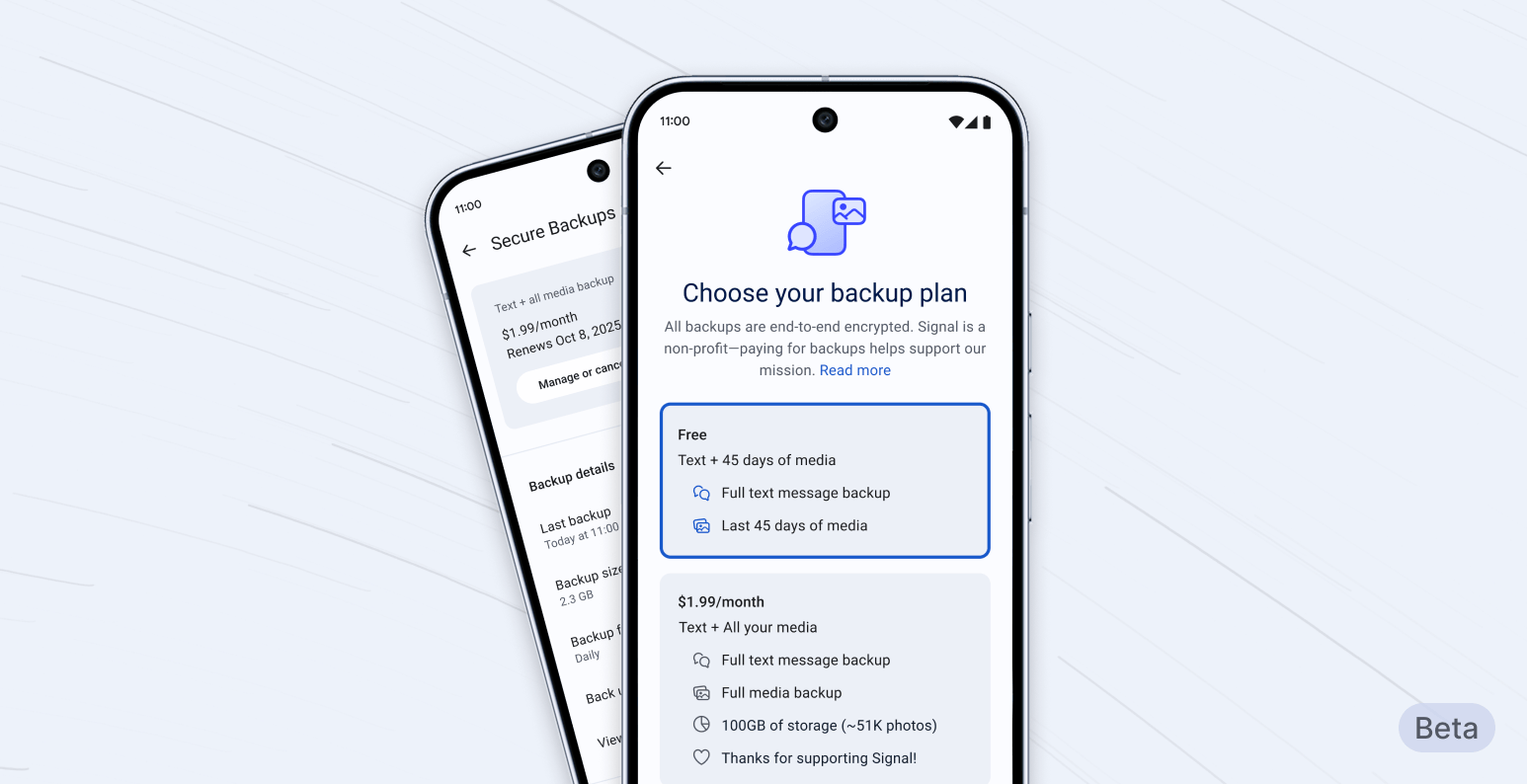
<p>If you do decide to opt in to secure backups, you’ll be able to securely back up all of your text messages<sup id="fnref:2"><a href="#fn:2" class="footnote" rel="footnote" role="doc-noteref">2</a></sup> and the last 45 days’ worth of media<sup id="fnref:3"><a href="#fn:3" class="footnote" rel="footnote" role="doc-noteref">3</a></sup> for free.</p>

<p>If you want to back up your media history beyond 45 days<sup id="fnref:4"><a href="#fn:4" class="footnote" rel="footnote" role="doc-noteref">4</a></sup>, as well as your message history, we also offer a paid subscription plan for US$1.99 per month.<sup id="fnref:5"><a href="#fn:5" class="footnote" rel="footnote" role="doc-noteref">5</a></sup></p>

<p>This is the first time we’ve offered a paid feature. The reason we’re doing this is simple: media requires a lot of storage, and storing and transferring large amounts of data is <a href="/blog/signal-is-expensive/">expensive</a>. As a nonprofit that refuses to collect or sell your data, Signal needs to cover those costs differently than other tech organizations that offer similar products but support themselves by selling ads and monetizing data.</p>

<h2 id="anatomy-of-secure-backups-privacy-first-always">Anatomy of Secure Backups: Privacy First, Always</h2>

<p>At Signal, our commitment to privacy informs which features we build and the ways that we build them.</p>

<p>Using the same zero-knowledge <a href="/blog/signal-private-group-system/">technology</a> that enables Signal groups to work without revealing intimate metadata, backup archives are stored without a direct link to a specific backup payment or Signal user account.</p>

<p>At the core of secure backups is a 64-character recovery key that is generated on your device. This key is yours and yours alone; it is never shared with Signal’s servers.<sup id="fnref:6"><a href="#fn:6" class="footnote" rel="footnote" role="doc-noteref">6</a></sup> <strong>Your recovery key is the only way to “unlock” your backup when you need to restore access to your messages. Losing it means losing access to your backup permanently, and Signal cannot help you recover it.</strong> You can generate a new key if you choose. We recommend storing this key securely (writing it down in a notebook or a secure password manager, for example).</p>

<p>These choices are part and parcel of Signal’s guiding mission to collect as close to no data as possible, and to make sure that any information that is required to make Signal robust and usable cannot be tied back to the people who depend on Signal.<sup id="fnref:7"><a href="#fn:7" class="footnote" rel="footnote" role="doc-noteref">7</a></sup> This is why wherever there’s a choice between security and any other objective, we’ve prioritized security.<sup id="fnref:8"><a href="#fn:8" class="footnote" rel="footnote" role="doc-noteref">8</a></sup></p>

<h2 id="enabling-secure-backups">Enabling Secure Backups</h2>

<p>If you want to opt in to secure backups, you can do so from your Signal Settings menu. For now, only people running the latest <a href="https://support.signal.org/hc/en-us/articles/360007318471-Signal-Beta">beta version</a> of Signal on Android will be able to opt in. But soon, we’ll be rolling this feature out across all platforms.</p>

<p>Once you’ve enabled secure backups, your device will automatically create a fresh secure backup archive every day, replacing the previous day’s archive.<sup id="fnref:9"><a href="#fn:9" class="footnote" rel="footnote" role="doc-noteref">9</a></sup> Only you can decrypt your backup archive, which will allow you to restore your message database (excluding <a href="/blog/view-once/">view-once messages</a> and messages scheduled to <a href="/blog/disappearing-messages/">disappear</a> within the next 24 hours). Because your secure backup archive is refreshed daily, anything you deleted in the past 24 hours, or any messages set to disappear are removed from the latest daily secure backup archive, as you intended.</p>

<h2 id="backing-up-moving-forward">Backing up, moving forward</h2>

<p>We’re excited to introduce secure backups, making sure you can retain access to your Signal messages even when your phone is lost or destroyed. But secure backups aren’t the end of the road.</p>

<p>The technology that underpins this initial version of secure backups will also serve as the foundation for more secure backup options in the near future. Our future plans include letting you save a secure backup archive to the location of your choosing, alongside features that let you transfer your encrypted message history between Android, iOS, and Desktop devices.</p>

<p>Secure backups are available in today’s Android beta release. A full public release, along with iOS and Desktop support, is coming soon.</p>

<div class="footnotes" role="doc-endnotes">
  <ol>
    <li id="fn:1">
      <p>Someone you’re chatting with could choose to back up your conversation even if you haven’t activated the feature. These chats will continue to be protected in ways that we explain in this post, ensuring that your Signal conversations are only accessible to you and the people you are communicating with. <a href="#fnref:1" class="reversefootnote" role="doc-backlink">&#8617;</a></p>
    </li>
    <li id="fn:2">
      <p>The free tier includes 100 MiB of message storage. Messages are compressed and stored in a secure backup archive, and we think 100 MiB will be large enough for even heavy Signal users to back up the text of all of their messages. <a href="#fnref:2" class="reversefootnote" role="doc-backlink">&#8617;</a></p>
    </li>
    <li id="fn:3">
      <p>Media comprises things like photos, videos, GIFs, files, and any attachments. <a href="#fnref:3" class="reversefootnote" role="doc-backlink">&#8617;</a></p>
    </li>
    <li id="fn:4">
      <p>The storage size limit for paid backups is 100 GB. <a href="#fnref:4" class="reversefootnote" role="doc-backlink">&#8617;</a></p>
    </li>
    <li id="fn:5">
      <p>Please note that prices are subject to change in the future. <a href="#fnref:5" class="reversefootnote" role="doc-backlink">&#8617;</a></p>
    </li>
    <li id="fn:6">
      <p>This key is different from your <a href="https://support.signal.org/hc/en-us/articles/360007059792-Signal-PIN">Signal PIN</a>, which serves different purposes. <a href="#fnref:6" class="reversefootnote" role="doc-backlink">&#8617;</a></p>
    </li>
    <li id="fn:7">
      <p>Another example: We have also taken extra steps to protect media by encrypting the already-encrypted files a second time with a key unique to your backup and adding padding to obscure their true size. This prevents malicious actors from comparing encrypted files to identify users who are in the same groups, in the unlikely instance that they gain access to the backup files. <a href="#fnref:7" class="reversefootnote" role="doc-backlink">&#8617;</a></p>
    </li>
    <li id="fn:8">
      <p>For instance, a catastrophic failure could render the most recent daily backup archive unrecoverable until the next backup cycle completes (which should occur within one day). While we believe such data loss is highly unlikely, this approach ensures that your message history remains protected against even the most sophisticated threats while smoothly recovering within 24 hours. <a href="#fnref:8" class="reversefootnote" role="doc-backlink">&#8617;</a></p>
    </li>
    <li id="fn:9">
      <p>Our open-source storage management software is available at <a href="https://github.com/signalapp/storage-manager">https://github.com/signalapp/storage-manager</a>. <a href="#fnref:9" class="reversefootnote" role="doc-backlink">&#8617;</a></p>
    </li>
  </ol>
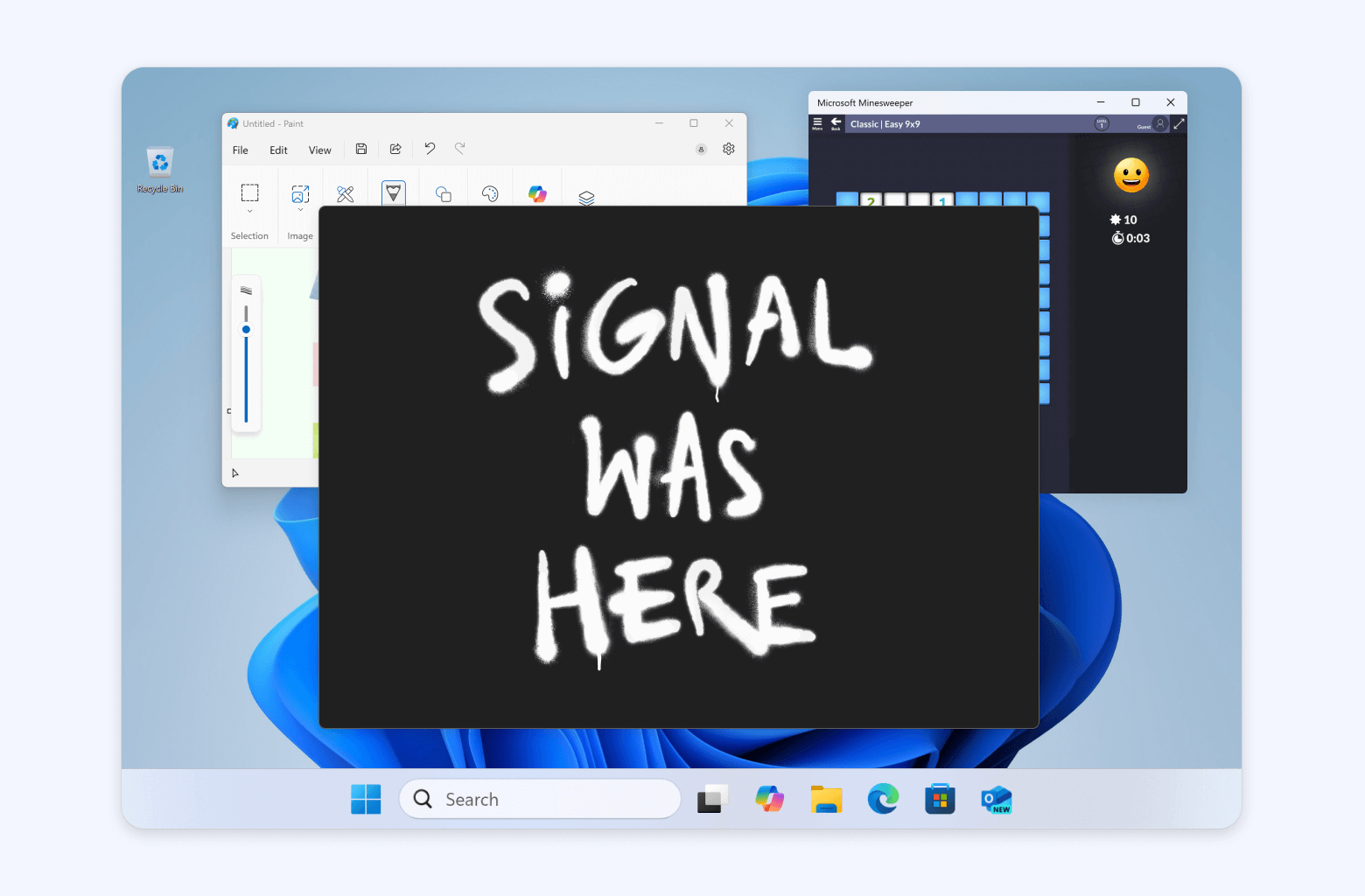
</div>]]></content><author><name>jimio</name></author><category term="blog" /><summary type="html"><![CDATA[]]></summary><media:thumbnail xmlns:media="http://search.yahoo.com/mrss/" url="https://signal.org/blog/images/backups-opengraph.png" /><media:content medium="image" url="https://signal.org/blog/images/backups-opengraph.png" xmlns:media="http://search.yahoo.com/mrss/" /></entry><entry><title type="html">Blog » By Default, Signal Doesn’t Recall</title><link href="https://signal.org/blog/signal-doesnt-recall/" rel="alternate" type="text/html" title="Blog » By Default, Signal Doesn’t Recall" /><published>2025-05-21T00:00:00+00:00</published><updated>2025-05-21T00:00:00+00:00</updated><id>https://signal.org/blog/signal-doesnt-recall</id><content type="html" xml:base="https://signal.org/blog/signal-doesnt-recall/"><![CDATA[<p><img src="/blog/images/recall-header.png" alt="A screenshot of a Microsoft Windows desktop. Microsoft Paint and Minesweeper are visible behind a black rectangular window that is empty except for graffiti-style text that says &quot;SIGNAL WAS HERE&quot;." /></p>

<p>Signal Desktop now includes support for a new “Screen security” setting that is designed to help prevent your own computer from capturing screenshots of your Signal chats on Windows. This setting is automatically enabled by default in Signal Desktop on Windows 11.</p>

<p>If you’re wondering why we’re only implementing this on Windows right now, it’s because the purpose of this setting is to protect your Signal messages from <a href="https://support.microsoft.com/en-us/windows/retrace-your-steps-with-recall-aa03f8a0-a78b-4b3e-b0a1-2eb8ac48701c">Microsoft Recall</a>.</p>

<p>XXXXX</p>

<p>First announced on May 20, 2024, Microsoft Recall takes screenshots of your apps every few seconds as you use your computer and then stores them in an easily searchable database. In Microsoft’s <a href="https://blogs.windows.com/windowsexperience/2024/06/07/update-on-the-recall-preview-feature-for-copilot-pcs/">own words</a>, its goal is to act as a sort of “photographic memory” for everything that you do on your computer. The words that other people chose to describe Recall upon its debut were decidedly less positive.<sup id="fnref:1"><a href="#fn:1" class="footnote" rel="footnote" role="doc-noteref">1</a></sup> After an intense <a href="https://www.wired.com/story/microsoft-recall-off-default-security-concerns/">security backlash</a> and significant public outcry, Microsoft quickly pulled the feature.</p>

<p>It’s a one-year anniversary that nobody wants to celebrate, but Recall <a href="https://arstechnica.com/security/2025/04/microsoft-is-putting-privacy-endangering-recall-back-into-windows-11/">is back</a> and Signal is ready.</p>

<p>Although Microsoft made several adjustments over the past twelve months in response to critical feedback, the revamped version of Recall still places any content that’s displayed within privacy-preserving apps like Signal at risk. As a result, we are enabling an extra layer of protection by default on Windows 11 in order to help maintain the security of Signal Desktop on that platform even though it introduces some usability trade-offs. Microsoft has simply given us no other option.</p>

<h2 id="fade-to-black">Fade to Black</h2>

<p>If you attempt to take a screenshot of Signal Desktop when screen security is enabled, nothing will appear. This limitation can be frustrating, but it might look familiar to you if you’ve ever had the audacity to try and take a screenshot of a movie or TV show on Windows. According to Microsoft’s <a href="https://learn.microsoft.com/en-us/windows/client-management/manage-recall#information-for-developers">official developer documentation</a>, setting the correct <a href="https://en.wikipedia.org/wiki/Digital_rights_management">Digital Rights Management</a> (DRM) flag on the application window will ensure that “content won’t show up in Recall or any other screenshot application.” So that’s exactly what Signal Desktop is now doing on Windows 11 by default.</p>

<p><img src="/blog/images/recall-drm-screenplay.jpg" alt="A stylized close-up crop of a movie screenplay that says &quot;INT. COPILOT+ PC MANUFACTURING FACILITY - NIGHT - METALLIC SHELVES in endless rows stretch into the darkness. Two figures crouch in the shadows. ALICE: DRM technology has been consistently used against us. BOB: It won't be the first time we've turned the tables. ALICE: My life has always felt like a movie.&quot;" /></p>

<p>Apps like Signal have essentially no control over what content Recall is able to capture, and implementing “DRM” that works for you (not against you) is the best choice that we had. It’s like a scene in a movie where the villain has switched sides, and you can’t screenshot this one by default either.</p>

<h2 id="warning-shots">Warning Shots</h2>

<p>Microsoft has launched Recall without granular settings for app developers that would enable Signal to easily protect privacy, which is a glaring omission that limits our choices. Signal is using the tools that are available to us even though we recognize that there are many legitimate use cases where someone might need to take a screenshot. For example, some accessibility software (such as screen readers or magnification tools for people who are visually impaired) may not function correctly otherwise.</p>

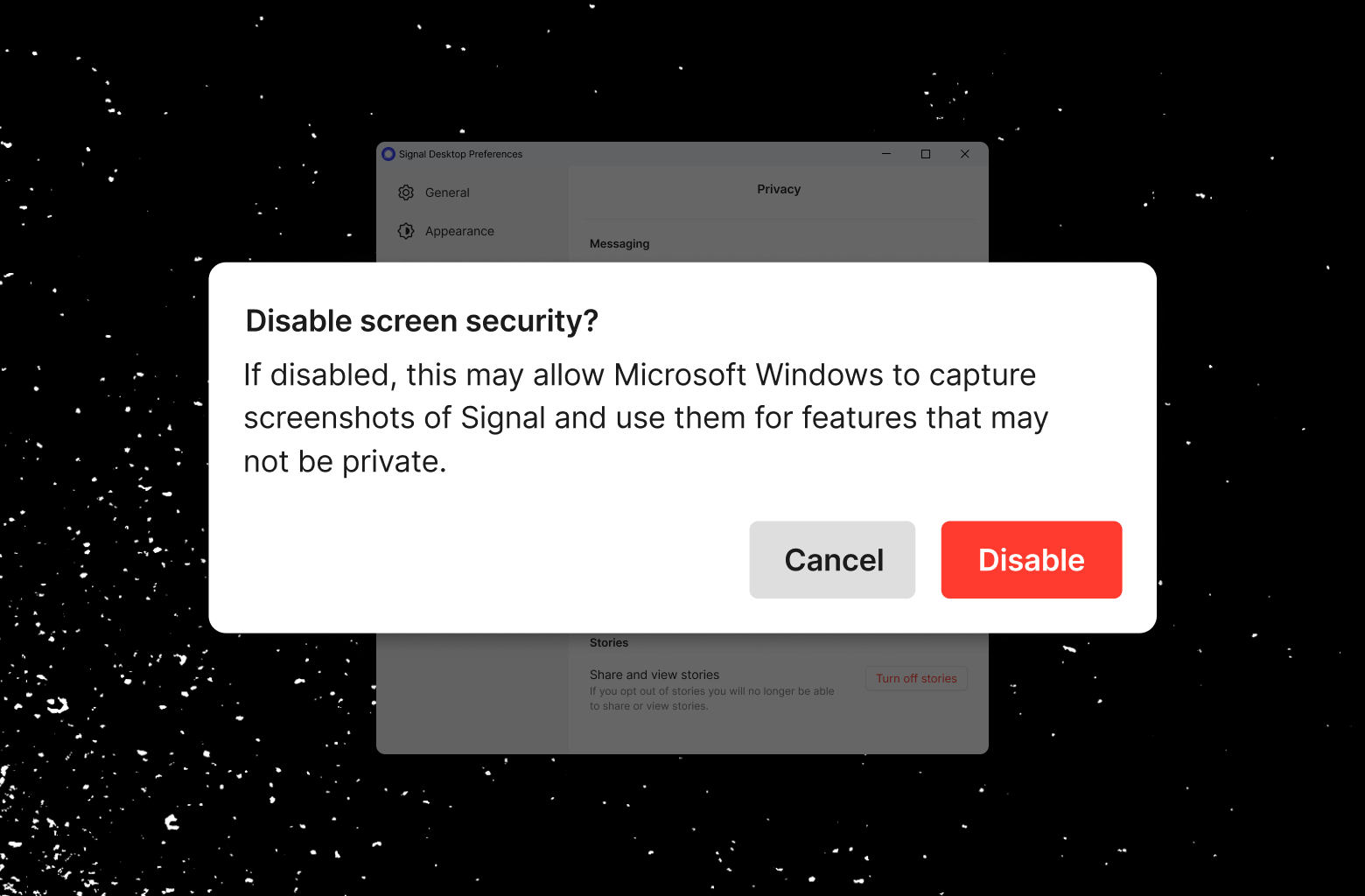
<p>To help mitigate this issue, we made the setting easy to disable <em>(Signal Settings → Privacy → Screen security)</em>, but it’s difficult to accidentally disable. Turning off “Screen security” in Signal Desktop on Windows 11 will always display a warning and require confirmation in order to continue.</p>

<p><img src="/blog/images/recall-warning.png" alt="A screenshot of a warning dialog box that says &quot;Disable screen security? If disabled, this may allow Microsoft Windows to capture screenshots of Signal and use them for features that may not be private.&quot;" /></p>

<p>This setting is local to your computer and doesn’t apply to screenshots on other devices. If you are communicating with someone who uses a screen reader on macOS or Linux, for example, keeping screen security enabled on your side won’t prevent them from taking screenshots or adversely affect any accessibility software they may be using.</p>

<p>We hope that the AI teams building systems like Recall will think through these implications more carefully in the future. Apps like Signal shouldn’t have to implement “one weird trick” in order to maintain the privacy and integrity of their services without proper developer tools. People who care about privacy shouldn’t be forced to sacrifice accessibility upon the altar of AI aspirations either.</p>

<h2 id="future-recallections">Future Recallections</h2>

<p>“Take a screenshot every few seconds” legitimately sounds like a suggestion from a low-parameter LLM that was given a prompt like “How do I add an arbitrary AI feature to my operating system as quickly as possible in order to make investors happy?” — but more sophisticated threats are on the horizon.</p>

<p>The integration of AI agents with pervasive permissions, questionable security hygiene, and an insatiable hunger for data has the potential to break <a href="https://techcrunch.com/2025/03/07/signal-president-meredith-whittaker-calls-out-agentic-ai-as-having-profound-security-and-privacy-issues/">the blood-brain barrier</a> between applications and operating systems. This poses a significant threat to Signal, and to every privacy-preserving application in general.</p>

<p>People everywhere rely on Signal to protect their communication, including human rights workers, governments, board rooms, militaries, and millions of individuals around the world for whom privacy is an existential matter. Apps like Signal must maintain their ability to prioritize security by default in a way that can be <a href="https://github.com/signalapp">publicly validated</a>. It’s imperative that privacy-preserving apps retain the ability to uphold these promises on every platform, including Microsoft Windows.</p>

<p>In order to do this, the ecosystem needs to do its part too. Operating system vendors, especially those who are shipping AI agents, need to ensure that the developers of apps like Signal always have the necessary tools and options at their disposal to reject granting OS-level AI systems access to any sensitive information within their apps.<sup id="fnref:2"><a href="#fn:2" class="footnote" rel="footnote" role="doc-noteref">2</a></sup></p>

<p><a href="https://www.cbsnews.com/news/ceo-zuckerberg-facebooks-5-core-values/">“Move fast and break things”</a> is going to be a tough habit for the tech industry to, well, break. But <a href="https://en.wikipedia.org/wiki/Minimum_viable_product">MVP</a> shouldn’t also stand for “Minimum Viable Precautions.” It’s ultimately up to companies like Microsoft to ensure that their platforms remain a suitable foundation for privacy-preserving applications like Signal. If that ever stops being the case, we’ll have to stop supporting those platforms.</p>

<p>Messaging apps are a window into your entire life. They’re where we share our favorite memories, fall in love, complain, smile, cry, and express who we really are. Given this reality, private messaging apps like Signal deserve to be treated with at least the same level of caution that’s afforded to a web browser’s private or incognito browsing window — which Microsoft has <a href="https://support.microsoft.com/en-us/windows/filtering-apps-websites-and-sensitive-information-in-recall-a4c28bee-e200-4a4a-b60d-c0522b404a5b">already excluded from Recall by default</a>.</p>

<p>Screen security for Signal Desktop on Microsoft Windows is rolling out now, and enabled by default on Windows 11. We’d like to express our sincere appreciation to the Signal community for helping us test this release during the beta period. We couldn’t do this work without your support.</p>

<div class="footnotes" role="doc-endnotes">
  <ol>
    <li id="fn:1">
      <p>A small sample: “Recall is equivalent to <a href="https://www.extremetech.com/internet/microsoft-postpones-the-release-of-its-recall-feature-after-backlash-security">Microsoft-sanctioned spyware</a>,” “<a href="https://bgr.com/tech/windows-11-creepy-recall-feature-has-been-recalled/">creepy</a>,” “<a href="https://www.pcmag.com/news/useful-or-potential-spyware-microsofts-recall-feature-draws-regulatory">a worrying proposal</a>,” and a “<a href="https://www.bbc.com/news/articles/cpwwqp6nx14o">privacy nightmare</a>.” <a href="#fnref:1" class="reversefootnote" role="doc-backlink">&#8617;</a></p>
    </li>
    <li id="fn:2">
      <p>Local AI models are sometimes treated as a panacea, but just because something is running on your own computer doesn’t instantly make it secure. For example, a local AI model with the right permissions could easily start scanning your documents and files in order to create a detailed profile for targeted ads in other apps or websites. <a href="#fnref:2" class="reversefootnote" role="doc-backlink">&#8617;</a></p>
    </li>
  </ol>
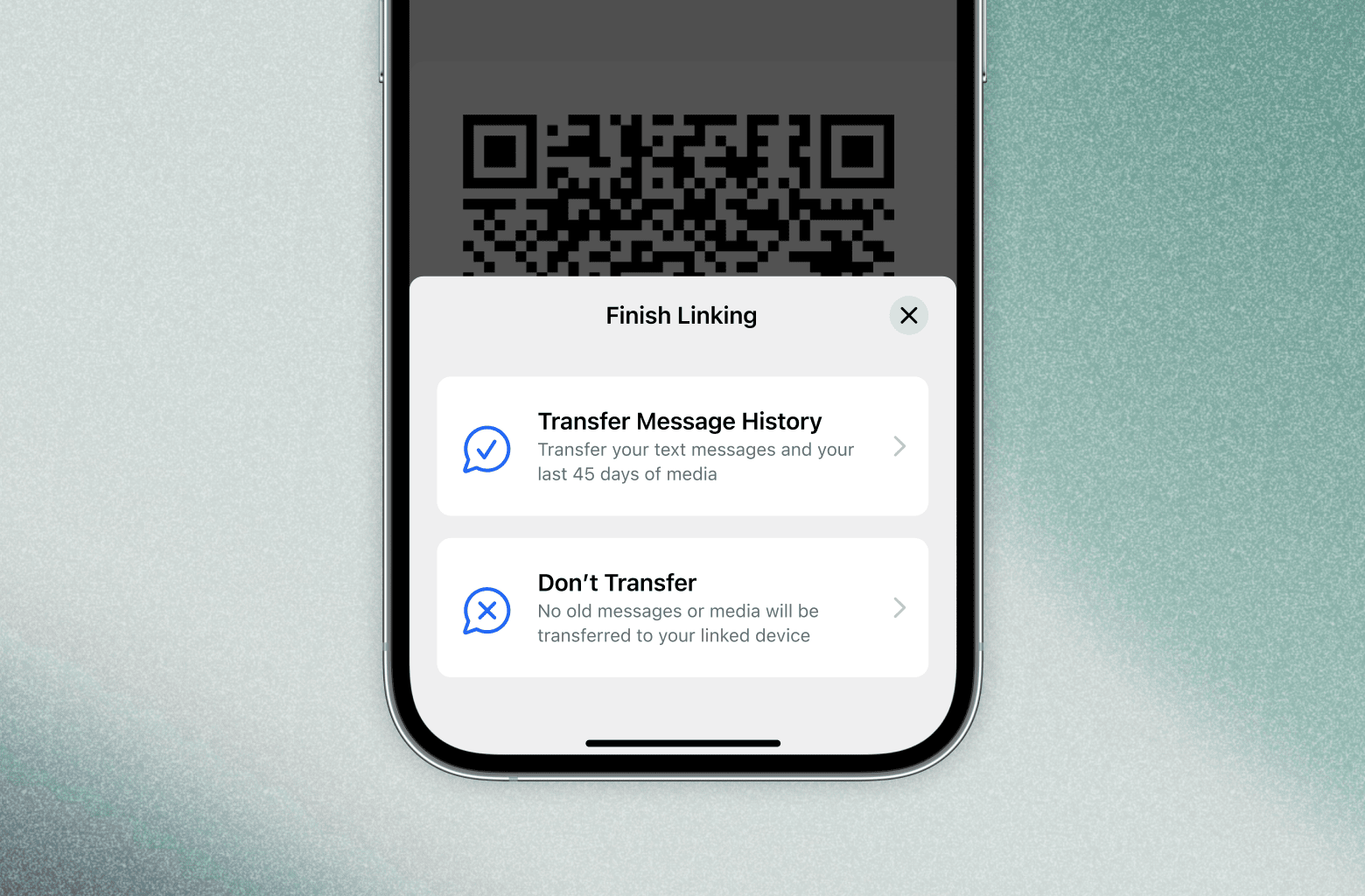
</div>]]></content><author><name>jlund</name></author><category term="blog" /><summary type="html"><![CDATA[]]></summary><media:thumbnail xmlns:media="http://search.yahoo.com/mrss/" url="https://signal.org/blog/images/recall-opengraph.png" /><media:content medium="image" url="https://signal.org/blog/images/recall-opengraph.png" xmlns:media="http://search.yahoo.com/mrss/" /></entry><entry><title type="html">Blog » A Synchronized Start for Linked Devices</title><link href="https://signal.org/blog/a-synchronized-start-for-linked-devices/" rel="alternate" type="text/html" title="Blog » A Synchronized Start for Linked Devices" /><published>2025-01-27T00:00:00+00:00</published><updated>2025-01-27T00:00:00+00:00</updated><id>https://signal.org/blog/a-synchronized-start-for-linked-devices</id><content type="html" xml:base="https://signal.org/blog/a-synchronized-start-for-linked-devices/"><![CDATA[<p><img src="/blog/images/synchronized-start-header.png" alt="A view of a mobile phone displaying the &quot;Finish Linking&quot; step. Two options are displayed: &quot;Transfer Message History&quot; and &quot;Don't Transfer.&quot;" /></p>

<p>With Signal on Desktop and iPad, you can link your primary Android or iOS account with another device, letting you check and respond to messages in both places or conduct video meetings and calls from the comfort of a bigger screen.</p>

<p>Signal’s upcoming beta releases will also introduce the option to transfer your messages and media when you link your primary Signal device to a new Desktop or iPad. Instead of starting fresh, and having only new messages show up, you can choose to bring your chats and your last 45 days of media with you. Or, you can choose not to.</p>

<p>XXXXX</p>

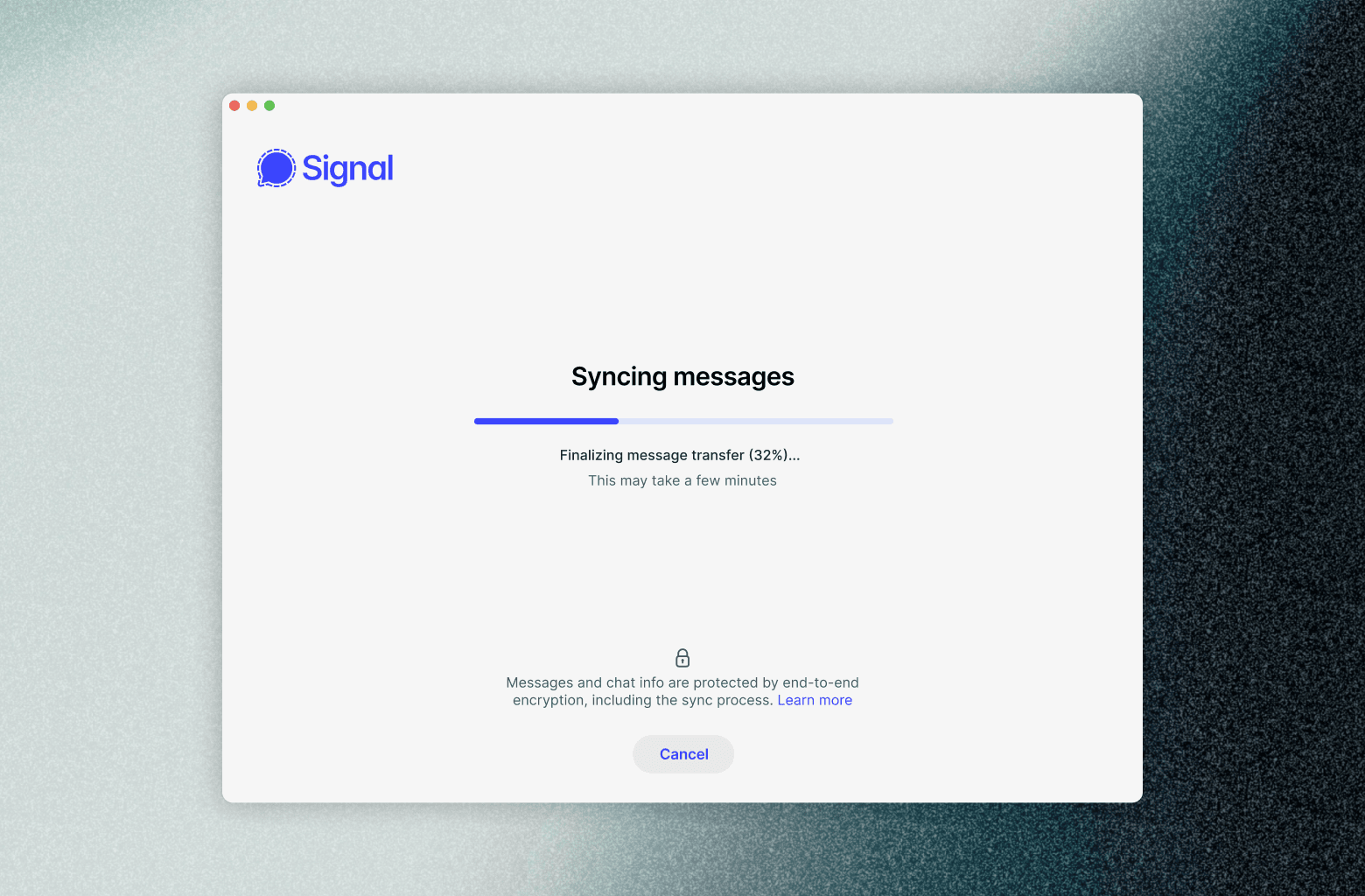
<p>Just like everything else in Signal, the process of transferring your messages to a new linked device is end-to-end encrypted and private. We designed this feature to be intuitive, fast, and simple — and you can <a href="https://support.signal.org/hc/articles/360007318471-Signal-Beta">help us start testing it soon</a> before it begins rolling out to production over the next several weeks.</p>

<p>From the perspective of the everyday person, this is a simple change. But like a lot in Signal, it required a good amount of engineering to implement it in a rigorous and privacy-preserving way. So if you’d like to take a peek under the hood, keep reading.</p>

<h2 id="you-own-your-messages">You Own Your Messages</h2>

<p>All of your data in Signal is end-to-end encrypted. We don’t have access to your message history (or your <a href="/blog/building-faster-oram/">contacts</a>, <a href="/blog/signal-private-group-system/">groups</a>, <a href="/blog/introducing-stories/">stories</a>, <a href="/blog/signal-profiles-beta/">profile avatars</a>, or <a href="/bigbrother/">anything else</a>). We go out of our way to know as close to nothing as possible about you and your data. This means that synchronizing your messages is complicated. Apps that don’t use end-to-end encryption have it easy: if the server has an unencrypted copy of all of your messages, every new linked device can just ask the server to send a copy of all of the stored messages. And bingo, everything is in sync! Plenty of unencrypted messengers operate this way — probably even ones you’ve used before. And while this is simple, these applications fail the <a href="https://blog.cryptographyengineering.com/2012/04/05/icloud-who-holds-key/">mud puddle test</a>. Meaning, they have access to your intimate communications and media in plaintext, allowing you to retrieve and sync your messages without your old device or any decryption keys, at the cost of their storing your communications history.</p>

<p>We’re not like that. We’re not willing to compromise on privacy, and so we need a way to transfer your history between devices without leaking any of your data to Signal or anyone else.</p>

<p>To safely transfer your Signal communication to a new device, Signal initiates a process by which everything having to do with your Signal app and account is bundled up into a compressed, encrypted archive. At your command, this end-to-end encrypted bundle is sent to your new device through the Signal servers. This device-to-device transfer is important. Your device is the only place where your message content is accessible. While our servers process your messages, to ensure they’re delivered to you, these messages are end-to-end encrypted so we can’t see or make sense of them.</p>

<p>Your personal devices are where your message history lives, and that means we have to transfer history between the devices themselves. To understand how, let’s start by talking about linked devices.</p>

<p><img src="/blog/images/synchronized-start-mobile-and-desktop.png" alt="A side-by-side screenshot of the mobile and Desktop Signal apps with the same chat displayed on both screens." /></p>

<h2 id="what-even-is-a-linked-device">What Even is a Linked Device?</h2>

<p>Signal accounts always have a primary device associated with them — as of now, this an Android or iOS device with a phone number. People can link additional Desktop and iPad devices to their primary Signal account. This lets people send and receive messages from any of their devices, and both incoming and outgoing messages appear on all linked devices.</p>

<p>All devices attached to an account share some keys for establishing and <a href="https://support.signal.org/hc/articles/360007060632-What-is-a-safety-number-and-why-do-I-see-that-it-changed">verifying</a> the owner’s identity, but every device has its own unique set of keys for encrypting and decrypting messages<sup id="fnref:1"><a href="#fn:1" class="footnote" rel="footnote" role="doc-noteref">1</a></sup>.</p>

<p>Of course, that doesn’t explain how devices get linked in the first place. How can we securely transfer keys to your new device, and what distinguishes it from a device an impersonator might try to link to your account?</p>

<h2 id="qr-coded-messages">QR Coded Messages</h2>

<p>To link a new Desktop or iPad device to an existing Signal account, the new device must prove it has the account holder’s permission to connect to the existing Signal account, and obtain a set of keys from the primary device. To do that, we need a way to initiate secure communication from the primary device to the new device. For this, a single encryption key sent from the primary device to the new device does the job, bootstrapping a secure connection through which we can send encrypted data. It turns out that even a simple QR code does the trick — the new linked device can display a QR code that includes all of the necessary information to bootstrap the process and send encrypted data through a secure connection. Just scan the code from your primary device to get started.</p>

<p>But how does this work under the hood? First, the new linked device creates a temporary “provisioning address” and records this address with the Signal servers so it can receive encrypted messages from the existing primary device. The new linked device puts this address, along with the public key for a locally-generated Curve25519 keypair into the QR code. Once the QR code has been created on the linked device, you can open the “Linked Devices” section in Signal settings on your primary device. After authentication, scanning the QR code with your primary device will then send a provisioning message — encrypted using the new linked device’s public key — to the provisioning address and the linked device that lives at this address.</p>

<p>The provisioning message is like the starting pistol at the beginning of a race. It contains everything the new linked device needs to communicate with the primary device and start working as another Signal instance: shared keys, account information, and a one-time-use linking token that cryptographically proves that the new device has permission to add itself to the Signal account.</p>

<p>Once the new linked device receives the provisioning message and adds itself to the same Signal account as the primary device, the linked device’s “mailbox” is ready. From this point forward, senders must send multiple copies of any messages for this Signal account, with each message encrypted separately for every device on the account.</p>

<p>This is the basic process by which we enable secure and private account linking on Signal. The changes we’re announcing here require additions to this process. In order to enable message and media history to be synchronized between primary and new devices, we’re adding a new key to this mix: a one-time-use message history encryption key.</p>

<h2 id="a-link-to-the-past">A Link to the Past</h2>

<p>To synchronize message history, we need to bundle the information on the primary Signal device and securely transfer it to the new linked device. Let’s talk about these pieces one by one.</p>

<p>First, your primary device compresses all message history into a single transferable archive. Signal isn’t just for text messages, and this end-to-end encrypted bundle also includes stickers, call history, group updates, quotes, reactions, and delivery/read receipts.</p>

<p>Second, we encrypt this archive with a strong, random, one-time-use 256-bit AES key that is securely transferred to the new linked device as part of the “provisioning message.” Because this archive is end-to-end encrypted, not even Signal employees can access its content or make sense of it. The encrypted archives that your primary device creates as part of this “link-and-sync” process are only available for a limited time. After the new linked device has downloaded and decrypted the end-to-end encrypted archive, it can throw away the key forever.</p>

<p>When people choose to synchronize their history with a new linked device, we want that device to instantly have a full and consistent history. That means we want all of the steps to be as fast as possible. No one wants to stare at their screens forever, waiting to use an essential app like Signal. And while Signal was built for speed, updating the application’s local database with potentially millions of messages all at once is a change. We’ve been able to speed up this process with performance optimizations like <a href="https://github.com/signalapp/Signal-Android/blob/034e04884c03637990233f0fd018dead1e83ff29/app/src/main/java/org/thoughtcrime/securesms/backup/v2/exporters/ChatItemArchiveExporter.kt#L109">careful batching</a> and minding our <a href="https://github.com/signalapp/Signal-Desktop/commit/60d7cbff3e3e0ea716078dae348becdf372cb030">write locality</a>. However, these tricks don’t help with large media attachments. For those, we needed to try other approaches.</p>

<h2 id="primer-attachments">Primer: Attachments</h2>

<p>When something big needs to be sent through Signal, we send it as an attachment. Big things include photos, videos, files, and really long text messages. Even the end-to-end encrypted archives that are transferred from the primary device to the new linked device — as mentioned in the previous section — are sent as attachments.</p>

<p>Let’s say that someone wants to send a friend a picture of their cat on Signal. To make this happen quickly and easily, instead of sending the large image directly inside a Signal message, Signal encrypts the cat pic and uploads it to a file server. To ensure that the intended recipient (and <em>only</em> the intended recipient) can see the cat pic, the sender shares a decryption key and the download location for the uploaded cat pic in a specially formatted Signal message. The sender can re-use the same location and key across multiple messages for each of the recipient’s linked devices, but the sender only needs to upload the large file once.</p>

<p>This speeds up the process of sending big things on Signal, while ensuring that only the intended recipient with the decryption key for the attachment can ever access it. We’re so serious about this level of privacy that all encrypted attachments are also <a href="https://en.wikipedia.org/wiki/Padding_(cryptography)">padded</a> to prevent those without the decryption key from determining the exact size of the encrypted attachment.</p>

<p>That’s how attachments are sent in Signal, to ensure privacy and speed. But of course we don’t want to hold onto that cat picture on our file servers forever, even if it’s end-to-end encrypted. The Signal servers automatically delete encrypted attachments 45 days after they are uploaded.</p>

<p>This follows from how Signal delivers your messages. Each device on a Signal account has its own mailbox. Devices are always retrieving messages from their mailbox when they are online, and as soon as the device confirms they’ve gotten a message, it is deleted from the Signal servers.</p>

<p>If a device has been offline for a while, it may have a lot of messages waiting in its mailbox when it returns. Today, Signal will hold a message in a device’s mailbox for up to 45 days, giving an idle device a chance to wake up and fetch it.</p>

<p>Since we know a message is only available for 45 days after it is sent, we assume that if a device hasn’t retrieved the attachment after 45 days, it won’t ever retrieve it.</p>

<p>It’d be nice if we could know when everyone has received your cat picture so we could delete the attachment earlier. But, we <em>really</em> don’t want to know who’s downloading a particular attachment and when, so we don’t track that. In general, we can’t tell who received an attachment pointer, how many received it, which message(s) included it, and who downloaded it — we’d like to keep it that way. So we always delete end-to-end encrypted attachments 45 days after they are uploaded.</p>

<h2 id="back-to-media-synchronization">Back to Media Synchronization</h2>

<p>We mentioned earlier that uploading media as part of the end-to-end encrypted archive that’s sent from the primary device to the new linked device would be too slow — so we don’t do this.</p>

<p>However, because end-to-end encrypted attachments are available for 45 days (to facilitate retrieval by offline devices as discussed above), we have a natural solution for synchronizing recent media. We include the pointers to attachments in the end-to-end encrypted archive that’s shared from the primary device to the new linked device, and the new linked device can fetch and decrypt them on demand without the primary device needing to re-upload large attachments as part of the synchronization process.</p>

<p>This works to enable fast media history synchronization without creating a burden on the network (whether a Signal user’s, or our own!). Right now this means we cannot synchronize media older than 45 days. However, we’re looking at ways to extend this and let people preserve more of their history in the future.</p>

<p>Using server-stored media means that the archive is mostly text. Not only does this reduce the amount of data that gets copied around to produce the archive to begin with, it also compresses very well. At Signal we exclusively use Signal to communicate with each other, and many of us have message histories going back for years. Even with our heavy Signal usage, we’ve found that our text message histories usually fit in just a few megabytes after compression.</p>

<p><img src="/blog/images/synchronized-start-transfer-progress.png" alt="A screenshot of Signal Desktop showing an in-progress message transfer at 32 percent." /></p>

<h2 id="whats-next">What’s Next</h2>

<p>Now that we have a cross-platform archive format for Signal messages, we’re already working on using it to give you optional new tools to transfer your messages when you get a device, or to restore your messages if you accidentally drop your phone in a lake. Look forward to more new features using this archive format in the future!</p>

<h2 id="acknowledgements">Acknowledgements</h2>

<p>Huge thanks to the engineering team that made this all happen. I could list them all, but the list would include most engineers at Signal (this really was a colossal project and we’re extremely excited to get this in your hands). Thank you to Josh Lund, Jon Chambers, Nina Berman, and Meredith Whittaker for their essential help shaping this blog post. And finally, thanks to the intrepid  members of the <a href="https://community.signalusers.org/t/help-us-test-desktop-history-syncing/65452">Signal community forums</a> who helped test out this feature ahead of a wider beta release.</p>

<div class="footnotes" role="doc-endnotes">
  <ol>
    <li id="fn:1">
      <p>In particular, linked devices for an account share an identity key pair, but independent prekeys, so they end up with independent session keys. See the <a href="/docs/specifications/pqxdh/#elliptic-curve-keys">Signal protocol documentation</a> for an overview of the keys involved. <a href="#fnref:1" class="reversefootnote" role="doc-backlink">&#8617;</a></p>
    </li>
  </ol>
</div>]]></content><author><name>ravi-signal</name></author><category term="blog" /><summary type="html"><![CDATA[]]></summary><media:thumbnail xmlns:media="http://search.yahoo.com/mrss/" url="https://signal.org/blog/images/synchronized-start-opengraph.png" /><media:content medium="image" url="https://signal.org/blog/images/synchronized-start-opengraph.png" xmlns:media="http://search.yahoo.com/mrss/" /></entry><entry><title type="html">Blog » Improving Private Signal Calls: Call Links &amp;amp; More</title><link href="https://signal.org/blog/call-links/" rel="alternate" type="text/html" title="Blog » Improving Private Signal Calls: Call Links &amp;amp; More" /><published>2024-11-11T00:00:00+00:00</published><updated>2024-11-11T00:00:00+00:00</updated><id>https://signal.org/blog/call-links</id><content type="html" xml:base="https://signal.org/blog/call-links/"><![CDATA[<p><img src="/blog/images/call-links-header.png" alt="Desktop view of a Signal video call with five participants against a blue and purple background" /></p>

<p>If you love group calls on Signal, but don’t want to create a group chat for every combination of your friends or colleagues, you’re in luck. <strong>Today we’re launching call links: Share a link with anyone on Signal and in just a tap or click they can join the call.</strong> No group chat required.</p>

<p>XXXXX</p>

<p>Call links join a suite of other features to improve Signal calling including a raise hand button, emoji reactions, a dedicated calls tab, and a number of improvements to the look and feel of Signal calls.</p>

<p>We believe that however you want to communicate – a text, a call, a voice message, a GIF, a video call, a story – you should be able to do it privately. We first <a href="/blog/signal/">introduced</a> private, end-to-end encrypted <a href="/blog/signal-video-calls-beta/">voice calls</a> in Signal calling back in 2014. Keeping with the times, we added video calls in 2017 and <a href="/blog/group-calls/">group video calls</a> in 2020.</p>

<p>Today, Signal as an organization runs all of our meetings using Signal calls, treating them as a substitute for the <a href="https://help.webex.com/en-us/article/st7tr1/Track-Participant-Attention-in-Cisco-Webex-Training#ID_2703_00001154">surveillance-heavy</a> video meeting services that grew in popularity after COVID hit.</p>

<p>We know we’re not alone here. Video calls have become a new normal meeting place for organizations, workplaces, and groups of friends all over the world. As communication norms change, Signal’s promise of a private place to communicate stays the same.</p>

<p>To make Signal calling better overall, we’ve spent the last few months building some welcome improvements. All of these features are available in the latest versions of Signal for Android, iOS, and Desktop. Update Signal to try them out!</p>

<p>Here’s what’s new:</p>
<ul>
  <li><strong>Call links:</strong> Instead of having to create a Signal group chat before starting a group call, you can create a link to let anyone on Signal quickly join a call. No group chat needed!</li>
  <li><strong>Raise hand button:</strong> Let people know that you have a question, a comment, or a joke to make without interrupting the flow of conversation</li>
  <li><strong>Emoji reactions</strong> in calls to make for a more dynamic conversation</li>
  <li><strong>Dedicated calls tab</strong> on your Signal home screen to see all of your call history in one place</li>
  <li><strong>More options to view</strong> speakers and participants when using Signal Desktop</li>
  <li><strong>Updated call settings</strong> to more easily turn your camera and mic on or off</li>
</ul>

<h2 id="call-links">Call links</h2>

<p>In the past, to start a group call in Signal you needed to first create a Signal group chat, then add people, and only then could you start a group call. Not anymore! Now, you can create a quick and easy link that anyone on Signal can use to join a call without having to join a Signal group chat first.</p>

<p>To create a call link, open Signal on your phone or Desktop and navigate to the calls tab. Tap or click to create a call link. You can decide if you want to name your link and whether you want to have control over approving people who want to join or if anyone can join without approval. By default, you’ll have to approve people before they can join a call.</p>

<p><img src="/blog/images/create-a-call-link.png" alt="Create a call link screen against a pink and purple background" /></p>

<p>Once it’s created, you can share your call link however you like.</p>

<p>If you’ve chosen to require admin approval before people can join a call, you’ll see requests to join the call which you can approve or decline. You can also remove people from calls and optionally block them from the call so they can’t join again.</p>

<p><img src="/blog/images/joining-call-link.png" alt="Admin view of attendees joining or waiting to join a call against a green background" /></p>

<p>Call links are reusable, so if you have a recurring phone date with your best friends or a weekly check-in with your coworkers, there’s no need to make a new call link every time.</p>

<p>Group calls are supported for up to 50 people. [Update: group calls are supported for up to 75 people as of 2026.]</p>

<p>For more details about how call links work, check out additional information in our <a href="https://support.signal.org/hc/articles/7860719423002-How-to-create-and-share-call-links">support center</a>.</p>

<h2 id="raise-hand-button-and-emoji-reactions">Raise hand button and emoji reactions</h2>

<p>To make for a richer calling experience without disrupting the pace of conversation, you can use the new raise hand button or share emoji reactions.</p>

<p>When multiple people raise their hands in a call, anyone in the call will be able to see the list of raised hands so that everyone can keep track of whose turn it is to speak. This way, everyone can weigh in without talking over each other when you ask all your friends for their opinion.</p>

<p><img src="/blog/images/calling-raise-hand.png" alt="Signal video call called Comms weekly showing multiple people using the raise hand button" /></p>

<p>Emoji reactions let you give some quick feedback to whatever is being said – celebrate someone’s good news, send some love, or tell everyone that your mind is blown without having to interrupt the speaker. And if enough people share the same emoji reaction in a short amount of time, you’ll see a fun emoji burst.</p>

<p><img src="/blog/images/calling-emoji-reactions.png" alt="Video call showing several participants using emoji reactions" /></p>

<h2 id="further-calling-improvements">Further calling improvements</h2>

<p>We’ve improved calls in Signal with several other changes.</p>

<p>You’ll now see a dedicated tab at the bottom of your phone screen or at the left-hand side of your Desktop app screen for all of your calls. You can much more easily see your call history, call people back, and manage your call links.</p>

<p><img src="/blog/images/calls-tab.png" alt="Signal call history screen including a calls tab at the bottom of the screen against an orange and blue background" /></p>

<p>You now also have more options for how you view call participants when calling via the Desktop app. You can now choose if you want to see them in Grid view, Sidebar view, or Speaker view.</p>

<p><img src="/blog/images/calling-desktop-view.png" alt="Signal call on desktop showing the options to view participants in grid view, sidebar view, or speaker view against a blue and beige background" /></p>

<p>We’ve updated the call control buttons, making it easier to turn your camera and microphone on or off, manage your speaker source, and see who else is in a call.</p>

<p><img src="/blog/images/call-control-buttons.png" alt="Call control buttons showing microphone and video settings against a mauve and green background" /></p>

<p>Try out these new features on the latest version of Signal for Android, Desktop, and iOS. We’ll keep on improving for Signal everyone who needs to connect with each other securely all over the world. To try out the latest features and offer crucial early feedback, <a href="https://support.signal.org/hc/en-us/articles/360007318471-Signal-Beta">join our beta</a>!</p>]]></content><author><name>Nina Berman|nina-signal</name></author><category term="blog" /><summary type="html"><![CDATA[]]></summary><media:thumbnail xmlns:media="http://search.yahoo.com/mrss/" url="https://signal.org/blog/images/call-links-opengraph.png" /><media:content medium="image" url="https://signal.org/blog/images/call-links-opengraph.png" xmlns:media="http://search.yahoo.com/mrss/" /></entry><entry><title type="html">Blog » Proxy Please: Help People Connect to Signal</title><link href="https://signal.org/blog/proxy-please/" rel="alternate" type="text/html" title="Blog » Proxy Please: Help People Connect to Signal" /><published>2024-08-09T00:00:00+00:00</published><updated>2024-08-09T00:00:00+00:00</updated><id>https://signal.org/blog/proxy-please</id><content type="html" xml:base="https://signal.org/blog/proxy-please/"><![CDATA[<p>Several countries have recently blocked Signal, leaving their residents without a trusted and safe place to communicate.</p>

<p>To help in this situation, Signal provides a built-in censorship circumvention feature and also includes support for a simple TLS proxy that can bypass these blocks in many circumstances and let people communicate privately.</p>

<p>XXXXX</p>

<ul>
  <li>To enable Signal’s built-in censorship circumvention feature, go to Signal Settings &gt; Privacy &gt; Advanced &gt; Censorship circumvention.</li>
  <li>Signal’s <a href="https://github.com/signalapp/Signal-TLS-Proxy">simple TLS proxy</a> is supported on both Signal Android and Signal iOS and can also work to bypass network blocks and securely route traffic to the Signal service. Anyone can set up a proxy, and once it’s deployed you will be able to provide a URL for people to start using it. Simply tap the URL on your device to get Signal connected to the proxy.
    <ul>
      <li>More information about connecting to a Signal proxy server and managing your proxy settings is <a href="https://support.signal.org/hc/articles/360056052052-Proxy-Support">available in our Support Center</a>.</li>
    </ul>
  </li>
</ul>

<p><strong>Please help if you can:</strong> To help make our circumvention efforts as effective as possible, we invite those who are willing and able to set up their own proxy servers to do so by following the instructions <a href="https://github.com/signalapp/Signal-TLS-Proxy">here</a>.</p>

<p>This isn’t the first time this has happened. We’ve shared information about running proxies before, first in <a href="/blog/help-iran-reconnect/">2021</a> and then again in <a href="/blog/run-a-proxy/">2022</a>, and each time the extended community pitched in to hugely extend our coverage. We’re grateful for their generosity and dedication, both then and now. Our hope is that this will help people access Signal in spite of government blocking while we explore additional techniques to ensure that Signal is available to anyone who wants or needs to use it.</p>

<h2 id="be-the-proxy">Be the proxy</h2>

<p>If you would like to run a proxy server, you can follow the updated setup instructions <a href="https://github.com/signalapp/Signal-TLS-Proxy">here</a>.</p>

<p>The Signal Android and Signal iOS apps are registered to handle links from the <code class="language-plaintext highlighter-rouge">signal.tube</code> domain so they can automatically configure proxy support when you tap on a link from any other app. You can also manually configure proxy information in your Signal Settings too:</p>

<ul>
  <li><strong>Android:</strong> Signal Settings &gt; Data and storage &gt; Proxy &gt; Use proxy</li>
  <li><strong>iOS:</strong> Signal Settings &gt; Privacy &gt; Advanced &gt; Proxy &gt; Use Proxy</li>
</ul>

<p>Unlike a standard HTTP proxy, connections to the Signal TLS Proxy look just like regular encrypted web traffic. There’s no <code class="language-plaintext highlighter-rouge">CONNECT</code> method in a plaintext request to reveal to censors that a proxy is being used. Valid TLS certificates are also provisioned for every proxy server, making it more difficult for censors to fingerprint the traffic than it would be if static self-signed certificates were used instead. In short, everything is designed to blend into the background as much as possible.</p>

<p>The Signal client establishes a normal TLS connection with the proxy, and the proxy simply forwards any bytes it receives to the actual Signal service. Any non-Signal traffic is blocked. Additionally, the Signal client still negotiates its standard TLS connection with the Signal endpoints through the tunnel.</p>

<p>This means that in addition to the end-to-end encryption that protects everything in Signal, all traffic remains opaque to the proxy operator.</p>

<h2 id="spread-the-word-use-the-hashtag-signalproxy">Spread the word: Use the hashtag #SignalProxy</h2>

<p>If you set up a Signal proxy, you’ll need to get the word out so that people can use it. Use the hashtag #SignalProxy to make it easy to find on the social platforms of your choice.</p>

<p>When you publicly post a <code class="language-plaintext highlighter-rouge">signal.tube</code> link, or if a particular server becomes too popular, it increases the chance that censors will add those IP addresses to their block lists.</p>

<p>A more discreet approach would be to announce publicly that you’ve created a Signal proxy and then offer to share connection details via DM or a non-public message. For example:</p>

<p><em>Reply to this thread if you want the connection details for my #SignalProxy, or send me a DM so I can share the link with you.</em></p>

<p>It’s easy to launch new proxies, and as long as there are servers in the world there is no limit to the number of Signal TLS proxies that people can run.</p>

<h2 id="shifting-grounds">Shifting grounds</h2>

<p>The world moves around us in unpredictable ways, and we will continue to do our best to keep Signal available for everyone who needs it, whenever they need it. Thank you for your support.</p>]]></content><author><name>Meredith Whittaker|meredith-signal</name></author><category term="blog" /><summary type="html"><![CDATA[Several countries have recently blocked Signal, leaving their residents without a trusted and safe place to communicate.]]></summary></entry></feed>